
1-Visitor
November 7, 2017
Question

Printing Bug with Plots - Prime 4.0

  • November 7, 2017
  • 2 replies
  • 4254 views

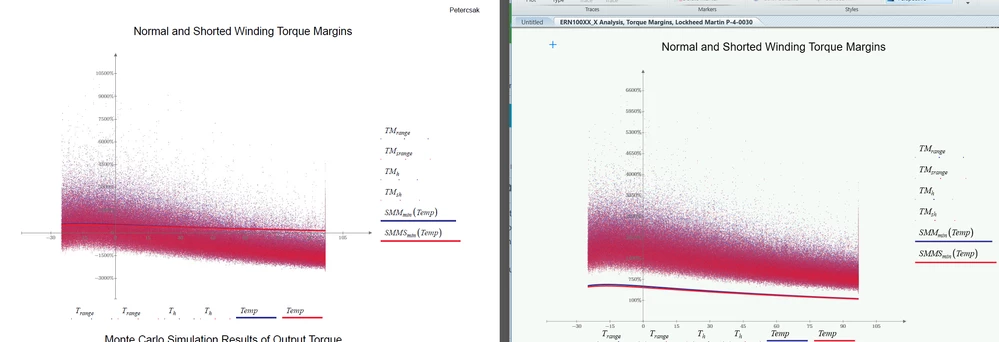
Ever since our upgrade to 4.0 we are noticing that the Y-Axis of the plots are getting replaced with the X-Axis numbers whenever we print.  It does not matter if we print to a printer or to a PDF file.  The MathCAD file is fine on the screen but all plots have the X-Axis data on both axes and the corresponding plotted data reacts to this and changes position on the graphs.  Our support contract recently expired and PTC does not seem interested in hearing about product bugs unless your uspport contract is up to date.  Below the PDF file in on the left and the MathCAD window is on the right...PrimeBugs.PNG
2 replies

23-Emerald I
November 7, 2017

What happens if you delete the last "Temp" on the X axis?

1-Visitor
November 7, 2017

PrimeBugs2.PNG

23-Emerald IV
November 7, 2017

Can you (are you allowed to...) post the worksheet? {You may have to zip it first, there  is (also...) a serious bug in this forum that mostly prevents attaching mathcad worksheet files.}


Does it also happen on a simple example, like:

LM_20171107_PrimePlots.png


Luc

24-Ruby III
November 8, 2017

What PDF printer do you use? Try "CutePDF Writer": http://www.cutepdf.com

1-Visitor
November 9, 2017

I have just tried CutePDFWriter and it did the exact same result.

24-Ruby III
November 10, 2017

Please report your issue for a PTC's tech support by using "Mathcad Support Center": https://support.ptc.com/support/mathcad_supportCenterOpt.htm