
10-Marble
June 14, 2023
Solved

Flush Surface Weld Symbol - How do I create?

  • June 14, 2023
  • 1 reply
  • 1707 views

I am using Creo Parametric Release 7.0 and Datecode7.0.7.0

How can I make the custom weld symbol that I need? I have an image of the symbol I need to create, but I don't know how to replicate it within Creo.

Image of symbol:
https://i.imgur.com/g0cREkW.png

A colleague created this symbol in SolidWorks. I need to put this symbol in my drawing in Creo.

Thanks,
Best answer by StephenW

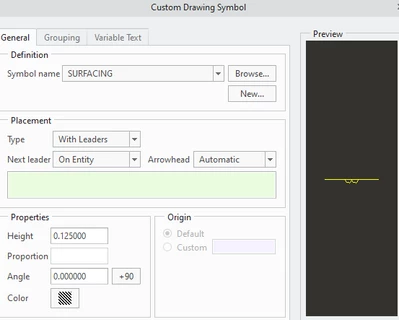
There should be a symbol in your loadpoint called surfacing.sym

mine is at C:\Program Files\PTC\Creo 6.0.6.0\Common Files\symbols\library_syms\weldsymlib\ansi_weld\simple


You can copy that symbol out and edit it as needed or just use it and sketch the flush line on the drawing.


StephenW_0-1686757858839.png


1 reply

StephenW23-Emerald IIIAnswer
23-Emerald III
June 14, 2023

There should be a symbol in your loadpoint called surfacing.sym

mine is at C:\Program Files\PTC\Creo 6.0.6.0\Common Files\symbols\library_syms\weldsymlib\ansi_weld\simple


You can copy that symbol out and edit it as needed or just use it and sketch the flush line on the drawing.


StephenW_0-1686757858839.png


10-Marble
June 14, 2023

Thanks Stephen. Initially I didn't see the option to add a tail and text to the symbol, but then I found it. Drawing the line manually is a little clunky, but maybe the line isn't a standard feature of a surface weld symbol.


I appreciate your quick response and help.