
15-Moonstone
December 30, 2020
Solved

Connecting the DropDown widget selection to a custom service

  • December 30, 2020
  • 2 replies
  • 1803 views

I'm trying to figure out how to allow a user to select from a dropdown menu and have that selection be used as input to a custom service that will ultimately populate the rest of the mashup. I've been beating my head against the wall trying to figure this out. I'm hoping you all can help me. Thanks in advance.
Best answer by Ashritha

Hi @Ike@ACE ,

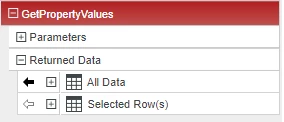
  1. Create the service that lists the drop down data in the infotable format
  2. Bind the service ALL DATA output to drop down widget and select the column to be displayed( ex: R1)
  3. Expand the SELECTED ROW and bind the required column (R1) to  a custom service as input

Capture.PNG


2 replies

5-Regular Member
December 31, 2020
Ashritha15-MoonstoneAnswer
15-Moonstone
December 31, 2020

Hi @Ike@ACE ,

  1. Create the service that lists the drop down data in the infotable format
  2. Bind the service ALL DATA output to drop down widget and select the column to be displayed( ex: R1)
  3. Expand the SELECTED ROW and bind the required column (R1) to  a custom service as input

Capture.PNG