

16-Pearl
January 9, 2020
Solved

HTML5 video rewind issue with Chrome

  • January 9, 2020
  • 2 replies
  • 25896 views

Hello

I use the HTML5 video estension and it works, however on the played video I cannot move the video cursor back or forward (to go directly to a specific position). When release the cursor into a position, it goes back to the previous playing position.

It just works moving back the cursor to the startup of the video.

I have this problem just with Chrome. Edge and Firefox works fine.


The mp4 file is ok, by testing it on a local html file with the <video> tag all is ok (even with chrome)

Is someone using this extension fine with Chrome ?


Best answer by VladimirRosu_116627

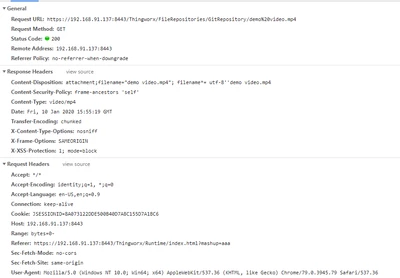
OK. So nothing wrong with the extension. What happens is that Chrome tries to request byte serving (sending the header Request: range 0-) and ThingWorx, since it does not support this, disregards this header and returns a response with code 200 in which it sends (in a chunked way) all the file. Chunked transfers and byte serving are totally different ways of serving content.


The problem is that Chrome is unforgiving and even if it does not receive the 206 Partial Content, it does not allow seeking. https://stackoverflow.com/questions/8088364/html5-video-will-not-loop

Preloading made no effect on this behaviour.


I presume that your other webserver returns a 206 or Accept-Range: none?

Check the response headers there and compare them to the TWX ones.


VladimirRosu_0-1578674529529.png

I consider this a bug in Chrome, especially since it has all the content loaded.


2 replies

15-Moonstone
January 10, 2020

Hi,

It worked fine in my side, here is my environment:

- Chrome 79.0.3945.88 (bit) or 79.0.3945.117 (64 bit)

ThingWorx 8.3.7-b35

- HTML5Video 1.0.0

I can move video cursor back or forward in Chrome browser.

You can place *.mp4 to <ThingWorx server>\tomcat\webapps\A folder (subfolder A needs to create),use below URL to access:

http://<ThingWorx host>:<port>/A/aaa.mp4

Use this URL as VideoLocation of HTML5 Video widget.

Maybe switch to another player (such as PotPlayer) for a try.


Regards,

Steven

iguerra16-PearlAuthor
16-Pearl
January 10, 2020

I tried now with

  • Chrome 79.0.3945.117
  • Thingworx 8.2.8-b856  (it is "cloud hosted" to PTC servers)
  • HTML5Video 1.0.0


but I have the problem

the mp4 video is located into a thingworx repository, and I use the repository path for the url.

This works fine on EDGE and Firefox.


May be it cloud be related on how the webserver "streams" the mp4 file ?

19-Tanzanite
January 10, 2020

Might be due to the way the MP4 is encoded. Searching our friendly engine Google, I found this link, which might apply: https://stackoverflow.com/questions/44408534/html5-video-in-chrome-forward-rewind-not-working

iguerra16-PearlAuthor
16-Pearl
January 10, 2020

I already saw this link, but this is not the problem


the same MP4 video can be played correctly even with Chrome into another webserver with just a simple html page like this

<!DOCTYPE html> 
<html> 
<body> 

<video width="400" controls>
 <source src="test.mp4" type="video/mp4">
 Your browser does not support HTML5 video.
</video>

</body> 
</html>


Seems something related to thingworx server or how the page is rendered

19-Tanzanite
January 10, 2020

Can you share with me the extension you're using and the file itself?