
10-Marble
June 6, 2025
Solved

How to change display format in ThingWorx bar chart

  • June 6, 2025
  • 2 replies
  • 556 views

I'm creating a bar chart in ThingWorx, and I need the hours I display in number format to be shown in hh:mm format (converted values), but I haven't found anything about this in the community or in the widget documentation.

I would like help with this.
Screenshot:
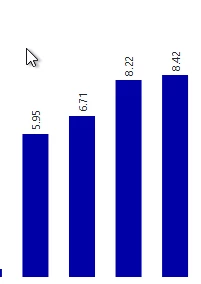
I want the 8.22 for example being shown as 8:13I want the 8.22 for example being shown as 8:13

Thingworx version: 9.3.8-b1504
Widget: Bar chart

Best answer by wcui

@slucasTN The Y-axis of bar chart widget only supports showing quantity which must be a number or integer.

The only workaround I can think of is to show <8.22> as <8.13> and you will need to prepare <8.13> in the data source becuase bar chart widget can not do the coversion from 8.22 to 8.13.

2 replies

wcui16-PearlAnswer
16-Pearl
June 10, 2025

@slucasTN The Y-axis of bar chart widget only supports showing quantity which must be a number or integer.

The only workaround I can think of is to show <8.22> as <8.13> and you will need to prepare <8.13> in the data source becuase bar chart widget can not do the coversion from 8.22 to 8.13.

16-Pearl
June 18, 2025

Hi slucasTN,

It appears that this comment answered your question.  For the benefit of other Community Members who may have the same question, it would be great if you could designate it as the Accepted Solution.

In the event that this response did not answer your question, please post your current status so that we can continue to support.

Thanks for using the PTC Community!

Regards,
Wenjing