

how to use openstreet map
Hi,
I am trying to use openstreet map as it is free unlike the google maps widget, but i dont know how , so i though to use the Html Text area widget as i couldnt find another html widget, i put this html inside it :
<!DOCTYPE html>
<html lang="en">
<head>
 <meta charset="UTF-8">
 <meta name="viewport" content="width=device-width, initial-scale=1.0">
 <title>OpenStreetMap Example</title>
 <style>
 /* Ensure the page takes up full height and removes margin/padding */
 html, body {
 height: 100%;
 margin: 0;
 padding: 0;
 overflow: hidden; /* Prevent scrollbars */
 }

 /* Container for the map */
 .map-container {
 width: 100%;
 height: 100%; /* Make the container fill the available height */
 border: 2px solid #ccc; /* Add a small border around the map */
 box-sizing: border-box; /* Ensure border is inside the container */
 }

 /* Ensure the iframe fills the map container */
 iframe {
 width: 100%;
 height: 100%; /* Use the full height of the map container */
 border: none; /* Remove the iframe's default border */
 }

 /* Additional styles to hide unwanted header and controls */
 iframe[src*="openstreetmap.org"] {
 display: block; /* Prevent inline-block and make sure the iframe takes up full width */
 }

 iframe[src*="openstreetmap.org"] + p {
 display: none; /* Hide the "OpenStreetMap Embedded Map" text */
 }
 </style>
</head>
<body>

 <!-- Map container with a small frame -->
 <div class="map-container">
 <iframe src="https://www.openstreetmap.org/export/embed.html?bbox=49.981493,26.245890,49.985093,26.247870&layer=mapnik&marker=26.246400,49.982544&noheader=true&nofollow=true&nozoom=true"
 frameborder="0"
 allowfullscreen=""></iframe>
 </div>

</body>
</html>
when i run this html in a separate html file the map take the whole window and this is what i want , but when i put this same code inside the text property in the html txt area it only take a small area in the corner like this photo,
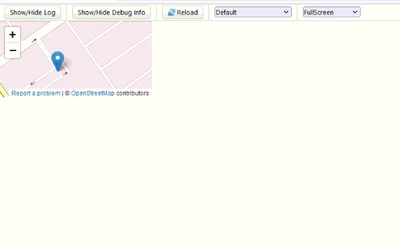
i am using thingworx 9.6 , i also couldnt use leaflet , when i installed it from github i cant finde the map link option and it felt like it is not going to work proprly , so how to do what i am aiming for, which is show some coordinates on a map and also make something like a tracking line to show all the previous locations also,
thank you,