
14-Alexandrite
July 30, 2018
Solved

How to add streamlines from Creo Flow Analysis?

  • July 30, 2018
  • 2 replies
  • 6076 views

After seeing the PTC Demo from LiveWorx of the Cirrus Vision Jet that had the streamlines around it in AR I would like to recreate a similar experience. https://twitter.com/LiveWorx/status/1011976485324795904 


How can we get the Streamlines from Creo Flow Analysis into Studio?

Is there a way to export those results to a PVZ or something like that?

If there is any other suggested method to reproduce a similar view that would be hugely appreciated.
Best answer by AllanThompson

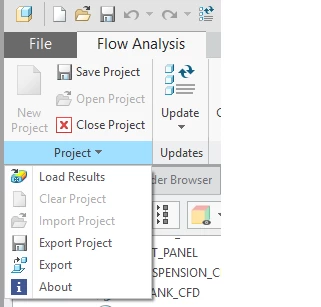
In the latest versions of Creo 5.0 (5.0.1.0) and Creo 4.0 (M050) there is the option to Export the streamlines from the results:


Untitled.png


This allows you to export an OBJ or a PVZ of the streamlines.  From what the PTC guys told me the rest of it is then done in Studio using some custom shaders, but I don't have the details on them unfortunately.


We've done some other work on this a while ago using the Vuforia SDK (now called Vuforia Engine) to bring in CFD results from ANSYS and overlay them on the physical product.  You can see examples here:

https://www.youtube.com/watch?v=KEwiUZLywgY

https://www.youtube.com/watch?v=bOMPkNYHhoA


Cheers,


Allan

2 replies

1-Visitor
July 30, 2018

I saw this demo at LiveWorx this yeah and was also really interested in it as I was trying to do the same thing with simulation data from Star CCM+ and not getting anywhere.


I have not tried this but i was told by the guy at the booth was that Simerics has an option to export the flow at a .obj object. Which is then really easy to import into Vuforia.

16-Pearl
August 1, 2018

In the latest versions of Creo 5.0 (5.0.1.0) and Creo 4.0 (M050) there is the option to Export the streamlines from the results:


Untitled.png


This allows you to export an OBJ or a PVZ of the streamlines.  From what the PTC guys told me the rest of it is then done in Studio using some custom shaders, but I don't have the details on them unfortunately.


We've done some other work on this a while ago using the Vuforia SDK (now called Vuforia Engine) to bring in CFD results from ANSYS and overlay them on the physical product.  You can see examples here:

https://www.youtube.com/watch?v=KEwiUZLywgY

https://www.youtube.com/watch?v=bOMPkNYHhoA


Cheers,


Allan

14-Alexandrite
August 1, 2018

Great thank you, not sure how I missed that.

Only problem I am having now is the streamlines are losing their colour.

My pvz files dont display in Studio while the OBJ files do. 

13-Aquamarine
August 9, 2018

Currently it is not possible to import or export the color data with .obj file in Creo Parametric.