
1-Visitor
April 6, 2020
Question

iPad Pro Bottom Navigation Bar

  • April 6, 2020
  • 2 replies
  • 7740 views

Is there anyway to make my experience workscreen extend all the way down to the bottom of the physical screen on an iPad pro? From what I can tell, the bottom bar  that is used as a swipe up to exit an app overrides the vuforia experience background. 


The image below is from one of the default experiences that comes with vuforia view and shows the bottom panel in the experience being placed above bottom bar that iOS uses. Boxed in yellow
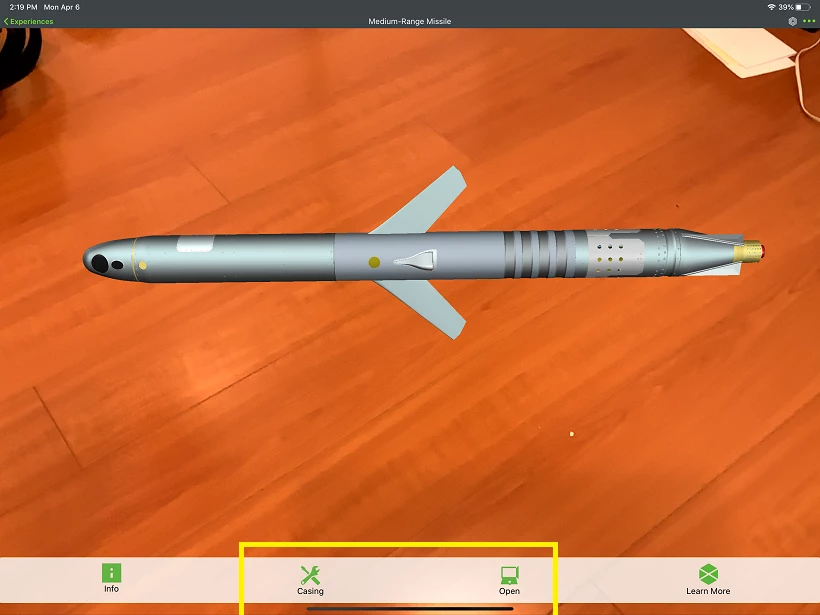


Home Bar Blocking Experience WorkscreenHome Bar Blocking Experience Workscreen


The image below is from one of the gallery view in vuforai view, notice that the iOS bar does not block off the workspace of vuforia view. Boxed in RedHome Bar overlapping with Vuforia View WorkscreenHome Bar overlapping with Vuforia View Workscreen
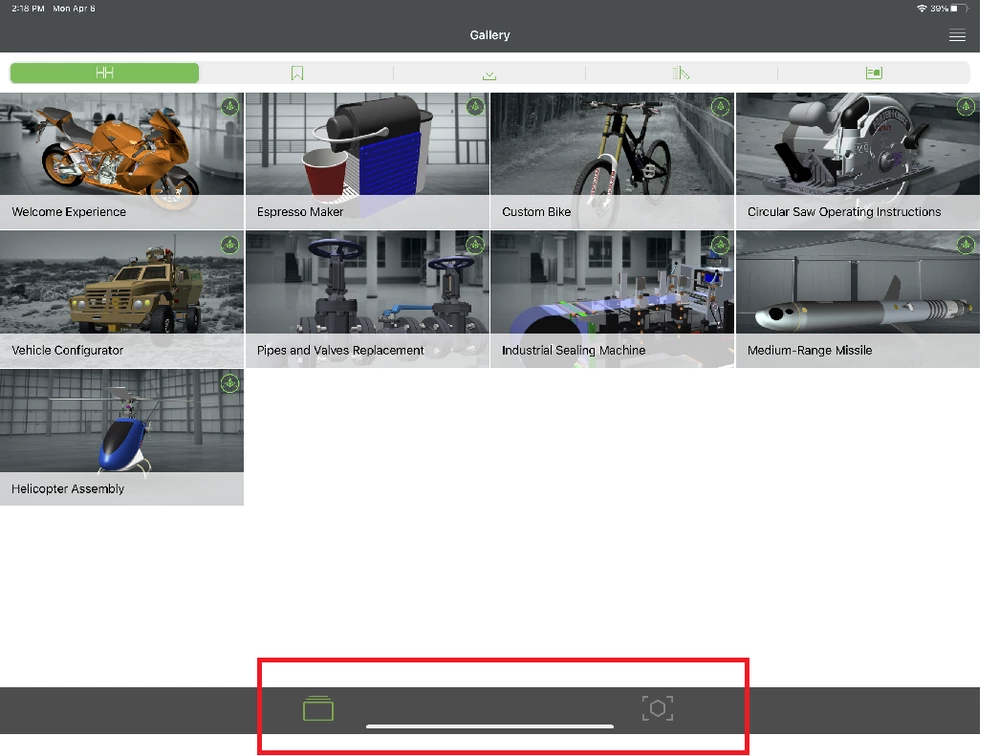
 

Any ideas? 

2 replies

17-Peridot
April 7, 2020

Hello CliffRice,


I suppose that this behavior is also reproducible in any Apps in an iPad or an iPhone with a Dock bar with some shortcuts to Apps inside it.

  • Is it correct ?


I have tried in my iPad 6 but I cannot use Slide Over, Multitask and Dock on it with iOS 13.4

I have found this video and article from Apple about this behavior:

https://www.youtube.com/watch?v=ITzy5J3j5Is

https://support.apple.com/fr-fr/HT207582


It seems possible to disable it.


When disabling Guided Access, I was able to have a hidden Dock. I didn't notice a same behavior as we can see in your screenshots.


  • Do you know which Settings have been modified to have this behavior with the Dock ?


Best regards,

Samuel

CliffRice1-VisitorAuthor
1-Visitor
April 8, 2020

@sdidier Thanks for your feedback on this one. But unfortunately I am still stuck 


I suppose that this behavior is also reproducible in any Apps in an iPad or an iPhone with a Dock bar with some shortcuts to Apps inside it.

  • Is it correct ?


Yes, This behavior is reproducible in any Vuforia View Experience on the iPad Pro 

No, This behavior is nor reproducible in any App, for example the Vuforia View App has this small horizontal bar overlapping with the bottom of the workscreen, as shown with the red box.Home Bar overlapping with Vuforia View WorkscreenHome Bar overlapping with Vuforia View Workscreen

Where as in the Vuforia View Experiences, it appears to cut off the workscreen, or define a new bottom maybe in this image with the blue box. 

BlueBox_EVIC.jpg

I can not speak to an iPhone because I do not have one with a Dock bar. But on an iPhone 7 this issue does not occur. Notice the bottom baner boxed in blow. This is the same experience as the image above but viewed on a iPhone 7. 


YellowBox_EVIC.jpg


It seems possible to disable it.


When disabling Guided Access, I was able to have a hidden Dock. I didn't notice a same behavior as we can see in your screenshots.


  • Do you know which Settings have been modified to have this behavior with the Dock ?


On my iPad Pro I do not have Guided Access enabled, and I do not see a way to disable this small horizontal bar. Nor do I want to disable it. I want the bottom panel to extend past the horizontal bar and to the bottom of the physical screen. 


Any ideas?

17-Peridot
April 27, 2020

Good morning Cliff;


I have reported that to R&D as a bug under the Jira ticket VTS-51.

When I will have a feedback from R&D, I will update this thread and this article also.

https://www.ptc.com/en/support/article/CS324157


Best regards,

Samuel

5-Regular Member
July 14, 2020

@CliffRice 


If you add following lines of code to your Application tab (css), this should work. Ensure to apply the additional classes found in the @media to the correct objects, if wanted. Additionally, add a background color to the Top and Bottom Panel.


//iPhone Notch portrait mode
ion-side-menus.view {
 left: 0px;
 width: 100vw;
 padding-left: env(safe-area-inset-left);
 padding-right: env(safe-area-inset-right);
}

//iPhone Notch landscape mode
ion-nav-view.view-container {
 height: 100vh;
 padding-bottom: env(safe-area-inset-bottom);
}


@media only screen and (orientation: landscape) {
 //Assign class to most left column in footer
 .columnLeft {
 margin-left: env(safe-area-inset-left);
 }
 //Assign class to most right most column in footer
 .columnRight {
 margin-right: env(safe-area-inset-right);
 }
}

@media only screen and (orientation: portrait) {
 //Assign class to the first gridLayout in the Bottom Panel
 .bottomPanelGrid {
 margin-bottom: env(safe-area-inset-bottom);
 }
}