

How can I populate Combobox2 based on the selected value in Combobox1?
Version: Windchill 11.2
Use Case: In the Create New Document Wizard, the values in Combobox2 should dynamically change based on the selection in Combobox1.
Description:
Hi there,
I want to implement a dynamic selection for an Azure-Windchill integration project.
I’ve written and tested two different functions, both of which are working:
- Function - func1: Retrieve repository names from Azure.
- Function - func2: Take a repository name as a parameter and retrieve folder names from the first two levels within that repository.
There is no issue with the functions; both work successfully when I manually input a repository name.
When the user starts the Wizard by selecting “New Document,” there are two different comboboxes in the opened window.
- Combobox1 holds a list of repository addresses.
- Combobox2 should hold the folder names within the repository based on the "selected" repository attribute value in Combobox1.
I can dynamically retrieve the values for Combobox1 with a data utility as soon as the window opens, and this works without any issues.
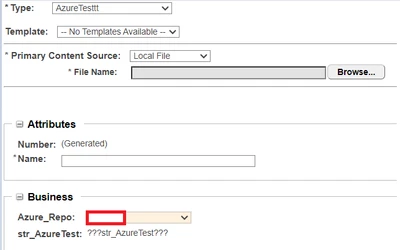
However,
My question is: How can I populate Combobox2 with the desired values based on the selected value in Combobox1? (Both of the comboboxes must be dynamic)
In the Create New Document Wizard, the values in Combobox2 should dynamically change based on the selection in Combobox1.
P.S. I don't have any problems with the Azure-Windchill connection, i can get correct values by my functions.