6-Contributor
April 30, 2025
Solved

Export CAD to Part BOM Compare

  • April 30, 2025
  • 2 replies
  • 850 views

Version: Windchill 12.1


Use Case: If you perform a Part to Part BOM Compare, you can export the table to Excel. If you perform a CAD to Part BOM Compare the export option is not available.


Description:

If you perform a Part to Part BOM Compare, you can export the table to Excel.
If you perform a CAD to Part BOM Compare the export option is not available.


Does anyone know if the export menus can be added to the CAD to Part Compare?

Best answer by HelesicPetr

Hi @MM_10260548 

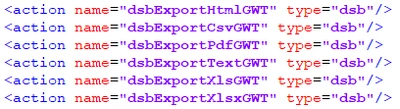
You can try to add the export menu to the comparation menu. 

just change a customActionModel.xml file . You have to find correct element to change and add a row for the export menu

just add the following rows
HelesicPetr_0-1745994906128.png

xml file is located in codebase\config\actions\customActionModel.xml

<?xml version="1.0" encoding="UTF-8"?>
<!DOCTYPE actionmodels SYSTEM "customActionmodels.dtd">
<actionmodels>
 <model name="dsvp2cPartTreeToolBar">
 <action name="resetCompare" type="dsv"/>
 <action name="prevDifference" type="dsb" />
 <action name="nextDifference" type="dsb" />
 <action name="separator" type="separator"/>
 <action name="publishToCADGWT" type="cat"/>
 <action name="buildCad" type="dsv"/>
 <action name="buildCadAndDesc" type="dsv"/>
	<action name="dsbExportHtmlGWT" type="dsb"/>
	<action name="dsbExportCsvGWT" type="dsb"/>
	<action name="dsbExportPdfGWT" type="dsb"/>
	<action name="dsbExportTextGWT" type="dsb"/>
	<action name="dsbExportXlsGWT" type="dsb"/>
	<action name="dsbExportXlsxGWT" type="dsb"/>
 </model>
</actionmodels>

Results

HelesicPetr_4-1745995067536.png


HelesicPetr_1-1745994937896.pngHelesicPetr_2-1745994950245.png


HelesicPetr_3-1745994998108.png

PS: it is not ideal, it can throw some errors if the wtpart does not have linked cad but it works.


PetrH

2 replies

HelesicPetr
22-Sapphire II
22-Sapphire II
April 30, 2025

Hi @MM_10260548 

You can try to add the export menu to the comparation menu. 

just change a customActionModel.xml file . You have to find correct element to change and add a row for the export menu

just add the following rows

HelesicPetr_0-1745994906128.png

xml file is located in codebase\config\actions\customActionModel.xml

<?xml version="1.0" encoding="UTF-8"?>
<!DOCTYPE actionmodels SYSTEM "customActionmodels.dtd">
<actionmodels>
 <model name="dsvp2cPartTreeToolBar">
 <action name="resetCompare" type="dsv"/>
 <action name="prevDifference" type="dsb" />
 <action name="nextDifference" type="dsb" />
 <action name="separator" type="separator"/>
 <action name="publishToCADGWT" type="cat"/>
 <action name="buildCad" type="dsv"/>
 <action name="buildCadAndDesc" type="dsv"/>
	<action name="dsbExportHtmlGWT" type="dsb"/>
	<action name="dsbExportCsvGWT" type="dsb"/>
	<action name="dsbExportPdfGWT" type="dsb"/>
	<action name="dsbExportTextGWT" type="dsb"/>
	<action name="dsbExportXlsGWT" type="dsb"/>
	<action name="dsbExportXlsxGWT" type="dsb"/>
 </model>
</actionmodels>

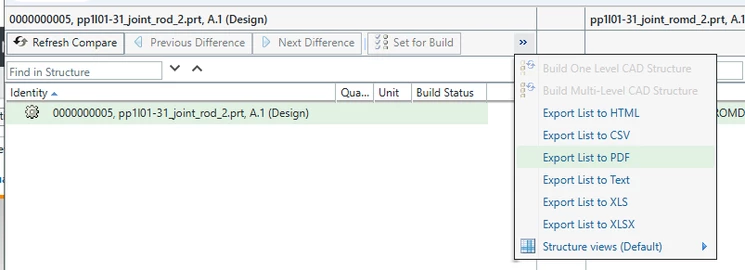
Results
HelesicPetr_4-1745995067536.png


HelesicPetr_1-1745994937896.pngHelesicPetr_2-1745994950245.png


HelesicPetr_3-1745994998108.png

PS: it is not ideal, it can throw some errors if the wtpart does not have linked cad but it works.


PetrH

19-Tanzanite
April 30, 2025

@HelesicPetr, will this work on the Part2Part compare also or do I need to look for another model in place of 

<model name="dsvp2cPartTreeToolBar">
HelesicPetr
22-Sapphire II
22-Sapphire II
May 5, 2025

Hi @BrianToussaint 

Actually I took the model(export function) from the PartToPart comparation wizard 😄 

HelesicPetr_0-1746423146519.png

PetrH

Community Moderator
May 7, 2025

Hello @MM_10260548,


It looks like you have some responses from some community members. If any of these replies helped you solve your question please mark the appropriate reply as the Accepted Solution. 

Of course, if you have more to share on your issue, please let the Community know so other community members can continue to help you.

Thanks,
Vivek N.
Community Moderation Team.