
1-Visitor
September 26, 2016
Question

C SDK with additional Edge Microserver

  • September 26, 2016
  • 2 replies
  • 4344 views

Hello All,

I am trying to use the SteamSensor example from the C SDK and I have the following requirements:

  • C SDK running on a Debian (Linux) client
  • Thingworx Server running on WIN 7

I have already created a thing from the RemoteThing Template and an application key in my Thingworx webbased GUI on my Windows 7.

I also adjust all the paramerts like host, port, appkey and so in my SteamSensor main.c.

When I am trying to run the example I got errors like this on my linux client:
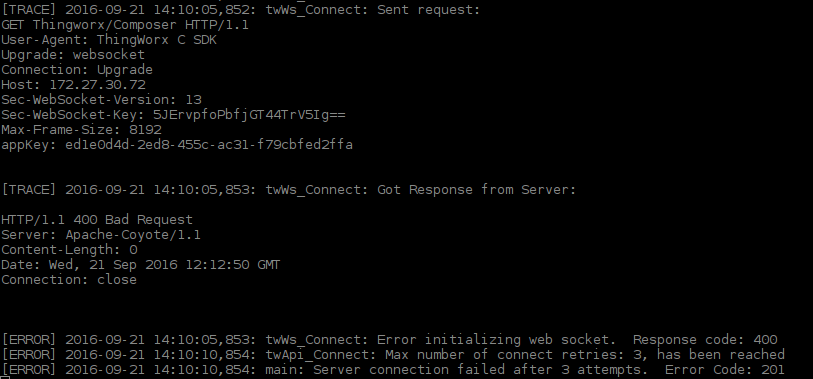
tw_error03.png

Do I always need an additional Edge Micrsoserver with my Edge SDK running on my linux client? Or how can I handle this error?

Thank you so much!

Greetings

2 replies

5-Regular Member
September 26, 2016

Artur, how have you formatted your connection string?

areich1-VisitorAuthor
1-Visitor
September 26, 2016

What kind of connection string do you mean?

in main.c

#define TW_HOST "xxx.xx.xx.xx" //IP Adress of my thingworx server (I am able to ping the server from my client)

in twDefaultSettings.h

#define TW_URI "Thingworx/WS"

The Adress in the browser of my server is:

xxx.xx.xx.xx:8080/Thingworx/Composer/index.html

5-Regular Member
September 26, 2016

A 400 error is a bad/malformed request. What all have you modified in your code? Were you able to connect with OOTB source and modified AppKey, IP, and port?

Meghan

areich1-VisitorAuthor
1-Visitor
September 26, 2016

Hello Meghan,

I wasn't able to connect with the OOTB source so I modified some values.

In the main.c I modified the thingName to the name of the created thing in my Thnigworx Composer.

I also modified the TW_HOST and the TW_APP_KEY.

In the twTls.c I modified the two variables like

tls->validateCert = FALSE;

tls->isEnabled = FALSE;

because I got SSL Connection errors. After this modification I don't get this SSL errors anymore.

In the twDefaultSettings.h I don't modified something. My TW_URI looks like:

"Thingworx/WS"

Thank you for your response!

5-Regular Member
September 26, 2016

You don't want to go into the twTls.c or twDefaultSettings.h file and change anything right away. Let's start with a fresh copy of the OOTB C SDK and modify the following:

  1. char * thingName = "SteamSensor1"; <-- This should equal whatever the entity name you've created in ThingWorx as your RemoteThing
  2. #define TW_HOST "localhost" <-- If your server and C SDK are running on the same machine "localhost" will suffice
  3. #define TW_APP_KEY "1724be81-fa15-4485-a966-287bf8f6683c" <-- Obviously you'll need to fill in-between the quotation marks with your AppKey in your server
  4. In the beginning of the main function there is a port #if defined section. If you are using port 80 just put the line, #define NO_TLS, above that section in the main function
  5. The final part you'll want to add right around the top of the main function is twApi_DisableEncryption(); That will prevent you from having to go in and change those pointers in twTls.c

This should be all you need to do for proper communication to occur. If this still does not work let me know and post any error message you are seeing.

Meghan