16-Pearl
May 13, 2025
Solved

Generate a Pre-Filled HTML Template in Browser for PDF Export – Is This Approach Possible?

  • May 13, 2025
  • 1 reply
  • 1053 views

Hello everyone,


I'm working on a feature in my ThingWorx application where I want to generate a PDF from a pre-defined HTML template (3 pages), but with a slightly different approach than typical mashup-based rendering.


Here’s the idea:

  • I have a fixed HTML template (a structured form or layout).

  • Only two fields need to be dynamically filled using values from the ThingWorx runtime.

  • The user should then see this HTML rendered directly in the browser (not inside a ThingWorx mashup container), just like a standalone form or page.

  • After that, the user can generate it as a PDF, and manually fill in the remaining fields on paper after printing if needed.

I’m aware of PDF generation extensions (e.g., twx.pdf.extension), but in this case, I’m looking for something lightweight and interactive, where HTML is opened first in the browser, filled on load (maybe via a service or URL parameters), and then saved or printed by the user.


Any tips, best practices, or sample setups would be much appreciated!

Thanks in advance!
Best answer by MA8731174

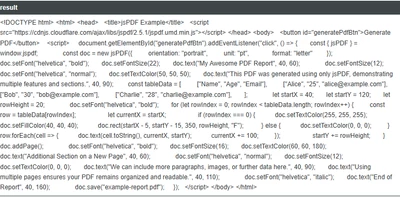
So for everyone else ,our solution was that in thingworx service we have choosen html as output and use jsdpf library as below:-


MA8731174_0-1747138226533.png


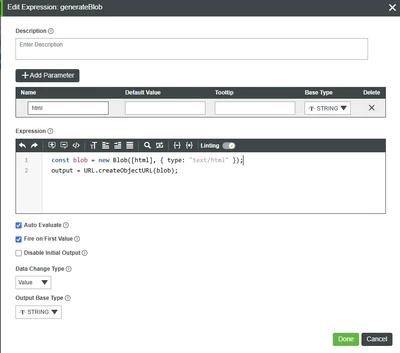
then on mashup load this service runs and assigns it to expression.

  • html is passed as a parameter (it contains HTML content as a string — from service).

  • A Blob is created with type "text/html".

  • The Blob is converted into a temporary URL using URL.createObjectURL(blob).

  • The output is a usable browser URL like blob:http://your-server/....


MA8731174_1-1747138260469.png


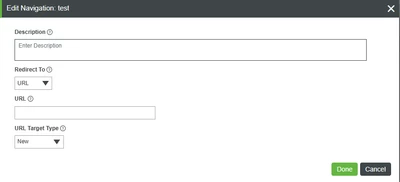
the output of expression we have assigned to NAVIGATION for url and then by clicking a button on mashup... it takes us to new tab and there i can generatepdf from my html..

MA8731174_2-1747138315698.png


one can also inject in html in thingworx like to fill the values any where with the code below:-


let template = Things["dummy.FileRepository"].LoadText({
path: "/PLN1/test.html"
});

template = template.replace("{{name}}", yourName);
template = template.replace("{{date}}", yourDate);

result = template;


I am happy to listen further suggestions about it...


1 reply

MA873117416-PearlAuthorAnswer
16-Pearl
May 13, 2025

So for everyone else ,our solution was that in thingworx service we have choosen html as output and use jsdpf library as below:-


MA8731174_0-1747138226533.png


then on mashup load this service runs and assigns it to expression.

  • html is passed as a parameter (it contains HTML content as a string — from service).

  • A Blob is created with type "text/html".

  • The Blob is converted into a temporary URL using URL.createObjectURL(blob).

  • The output is a usable browser URL like blob:http://your-server/....


MA8731174_1-1747138260469.png


the output of expression we have assigned to NAVIGATION for url and then by clicking a button on mashup... it takes us to new tab and there i can generatepdf from my html..

MA8731174_2-1747138315698.png


one can also inject in html in thingworx like to fill the values any where with the code below:-


let template = Things["dummy.FileRepository"].LoadText({
path: "/PLN1/test.html"
});

template = template.replace("{{name}}", yourName);
template = template.replace("{{date}}", yourDate);

result = template;


I am happy to listen further suggestions about it...


16-Pearl
May 29, 2025

Hi @MA8731174, thanks for sharing the idea. It sounds very creative to me. Good work!

I guess you can also mark this as a resolution so that potentially more people can see this.

MA873117416-PearlAuthor
16-Pearl
June 2, 2025

Thank you! I have marked it as solution.