17-Peridot
February 14, 2024
Solved

How AMU attribute logging works?

  • February 14, 2024
  • 1 reply
  • 3150 views


I need to log and show case the STRING attributes in AMU. I'm having a following queries,


  1. Is STRING attributes logged? in MSSQL or Value stream?
  2. How to log the STRING values?
  3. What is best practice to display STRING values if we started logging?
  4. What if the asset status coming as STRING? Ex. ACTIVE (Running), ISSUE (NOT RUNNING).
  5. How to calculate Runtime and Downtime of the asset for the selected time interval?

@mstarnaud 

Best answer by mstarnaud

Hi Satishkumar


#1 : Yes, you can use string values in AMU, but you might have some limitations if you try to use it as the status or if you want to use special values for alarming, also I never tried them in Troubleshooter (the trending/graph tool). For logging all the tag values, yes this part works as expected. The way it works in AMU is the values will be in Valuestream for a few moments and then AMU will transfer them to the AttributeValue table of the other database.


#2 : Same as with other tags : go in the Configuration -> Equipment -> Attributes screen, create an attribute, select your tag.


#3 : Like I said in #1 I don't remember how it works in the Troubleshooter/trend. But in the Asset Card (the card with the 9 attributes), it should display the values automatically, without you needing to do anything else. There may be a limit to the number of characters shown in the screen.


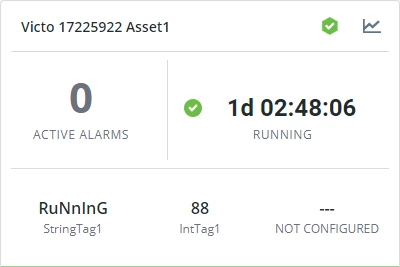
Here is an example I made recently (look at StringTag1) : 
mstarnaud_1-1707947231620.png

To accomplish this, I simply created an equipment in the Configuration -> Equipment screen and created 2 attributes : one for my string tag and one for my integer tag. And then in the Asset Card tab I selected them both and also selected the status.


#4 : I actually was debugging this a few days ago, and it's not working the way it's supposed to because of a limitation (as mentioned in point #1). The problem is it uses the status' tag, but forces to convert it into boolean. So this conversion recognizes the words "true" and "false", but all other texts are converted to False. Similarly, numbers only work with 0 (false) and not-0 (true). So using different words (like "Active" and "Issue") would require a workaround. I haven't tested this, but here is my suggestion :

- In the configuration screen, link your tag as the Status tag.

- In Composer remove its tag binding (on RunningStaus_MCC).

- Create an extra property on the Thing that receives the same tag

- Create a Subscription for this new extra property (input = DataChange) and in the code of the subscription transform it into "true" or "false" based on your rule (Active vs Issue) and in the code save the true/false result into RunningStatus_MCC.


#5 : I see 3 ways of doing this, but nothing easy with AMU : 

- Use the RTPPM software (or DPM). This is a feature that's part of RTPPM. You should be able to find multiple statistics based on this in RTPPM.

- (Using only AMU) use the Troubleshooter trending tool, you can also export its data to Excel. However I don't think it gives you the total. You can also configure an alarm and check the alarms in Troubleshooter, but again I suspect it won't give you the total uptime & downtime. I suggest you set up a test equipment and try the Troubleshooter to see how you can use it best.

- (Using only AMU) you could make a custom service that gets your wanted time range and equipment, and query the data from the SQL tables. You could either query AttributeValue (raw tag values) and do some calculations, or the sum of times in the AlarmEvent table if you configure it as an Alarm. If you want, you can even create a custom Mashup and add it to the main menu.

1 reply

mstarnaud
mstarnaud16-PearlAnswer
16-Pearl
February 14, 2024

Hi Satishkumar


#1 : Yes, you can use string values in AMU, but you might have some limitations if you try to use it as the status or if you want to use special values for alarming, also I never tried them in Troubleshooter (the trending/graph tool). For logging all the tag values, yes this part works as expected. The way it works in AMU is the values will be in Valuestream for a few moments and then AMU will transfer them to the AttributeValue table of the other database.


#2 : Same as with other tags : go in the Configuration -> Equipment -> Attributes screen, create an attribute, select your tag.


#3 : Like I said in #1 I don't remember how it works in the Troubleshooter/trend. But in the Asset Card (the card with the 9 attributes), it should display the values automatically, without you needing to do anything else. There may be a limit to the number of characters shown in the screen.


Here is an example I made recently (look at StringTag1) : 

mstarnaud_1-1707947231620.png

To accomplish this, I simply created an equipment in the Configuration -> Equipment screen and created 2 attributes : one for my string tag and one for my integer tag. And then in the Asset Card tab I selected them both and also selected the status.


#4 : I actually was debugging this a few days ago, and it's not working the way it's supposed to because of a limitation (as mentioned in point #1). The problem is it uses the status' tag, but forces to convert it into boolean. So this conversion recognizes the words "true" and "false", but all other texts are converted to False. Similarly, numbers only work with 0 (false) and not-0 (true). So using different words (like "Active" and "Issue") would require a workaround. I haven't tested this, but here is my suggestion :

- In the configuration screen, link your tag as the Status tag.

- In Composer remove its tag binding (on RunningStaus_MCC).

- Create an extra property on the Thing that receives the same tag

- Create a Subscription for this new extra property (input = DataChange) and in the code of the subscription transform it into "true" or "false" based on your rule (Active vs Issue) and in the code save the true/false result into RunningStatus_MCC.


#5 : I see 3 ways of doing this, but nothing easy with AMU : 

- Use the RTPPM software (or DPM). This is a feature that's part of RTPPM. You should be able to find multiple statistics based on this in RTPPM.

- (Using only AMU) use the Troubleshooter trending tool, you can also export its data to Excel. However I don't think it gives you the total. You can also configure an alarm and check the alarms in Troubleshooter, but again I suspect it won't give you the total uptime & downtime. I suggest you set up a test equipment and try the Troubleshooter to see how you can use it best.

- (Using only AMU) you could make a custom service that gets your wanted time range and equipment, and query the data from the SQL tables. You could either query AttributeValue (raw tag values) and do some calculations, or the sum of times in the AlarmEvent table if you configure it as an Alarm. If you want, you can even create a custom Mashup and add it to the main menu.

17-Peridot
February 16, 2024

Thanks for the detailed explanation. 

I agree with you and explore the options suggested.


Regarding #4: RunningStatus_MCC property is BOOLEAN and Remote Property. Is possible to update the remote property from subscription or service without binding with kepware tag?


mstarnaud
16-Pearl
February 16, 2024

Hi Satishkumar


2 stuffs to know about this : 

- RunningStatus_MCC will need to be "correctly configured". The easy way to do this is by using the Configuration -> Equipment -> Asset Card screen and selecting an attribute to be Status. You can try to do the changes manually in Composer instead, but it's not supported and I really don't suggest doing it, I encourage you to use the official configuration screen.

- This point here is not officially supported, but I think can be a good custom workaround : once RunningStatus_MCC is "correctly configured", you can remove its tag binding in Composer and then have some piece of code to push values into it. This is the workaround I suggested if you want your status to be string-based, since strings don't work well for the status. If you leave the tag binding on, I think it will not let you update the value using code. I believe in your code it should look like this :

me.RunningStatus_MCC = true;


Note that the Asset Card does read the RunningStatus_MCC property to show you the current running/down status. However it doesn't keep track of the old values & times, so you can't make a report on this. This is why for question #5 we need extra steps, to save this data elsewhere and do our own running/down conversion in custom code.