
16-Pearl
September 11, 2023
Solved

how to increase execution time to run query in Database-Thing from thingworx

  • September 11, 2023
  • 1 reply
  • 1614 views

We created Database-Thing using Database ThingTemplate. If the query executed for more than 60 seconds, execution stopped and throwing below error.

Error:

Unable to Invoke Service Query on Database-Thing : Execute Query failed: net.snowflake.client.jdbc.SnowflakeSQLException: SQL execution canceled


The input query takes 3 minutes to fetch output. But Thingworx connectivity is not allowing to execute query more than 1 minute. Kindly let me know how to increase execution time to run query in Database-Thing.
 

Best answer by Arun_C

Hi @AP_10343008 ,


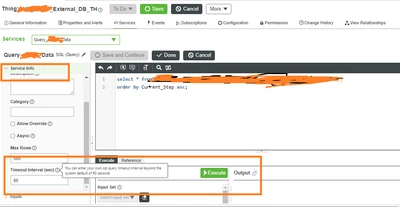
Also you can try directly increase the service timeout in database's entity service info level itself.


Arun_C_2-1694495487740.png


Thanks & Regards,

Arun C


1 reply

16-Pearl
September 12, 2023

Hi @AP_10343008 ,


By updating the ScriptTimeout in Platform-Settings Json will helps to increase the service execution time in thingworx.


"BasicSettings": {
 ...
 "ScriptTimeout": 60
}


Kindly find the below attched articles it may helps you. 

Thanks & Regards,

Arun C

Arun_C16-PearlAnswer
16-Pearl
September 12, 2023

Hi @AP_10343008 ,


Also you can try directly increase the service timeout in database's entity service info level itself.


Arun_C_2-1694495487740.png


Thanks & Regards,

Arun C