15-Moonstone
July 17, 2018
Solved

How to invoke service via REST in HTML?

  • July 17, 2018
  • 11 replies
  • 9837 views

Hi,

I try to setup an OData connector from Thingworx to PDMLink.

Version is 11.0 for PDMLink, 8.1.5 for TX.

Navigate is installed, SSO mode with a PDMLink authentication ( ie no PingFederate )

Everything works fine in Navigate.

But I can't make the OData connector works.


My configuration :

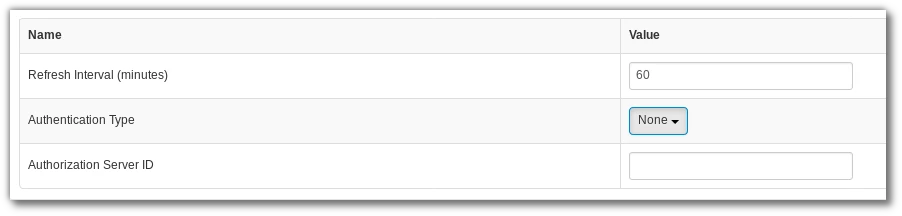
No Auth ( driven by SSL certificate... )
 

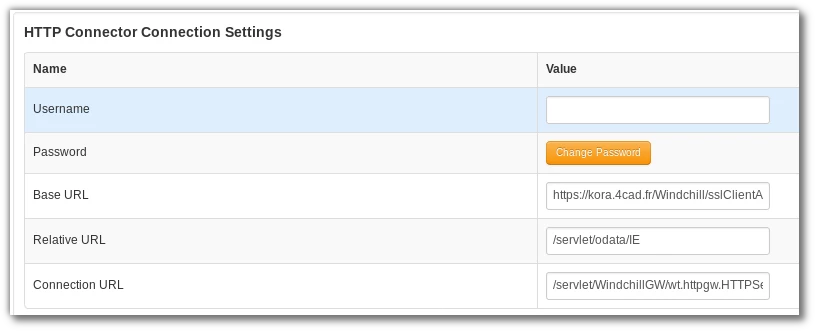
Sélection_023.png


Connection definition

 Sélection_024.png


Base url is https://kora.4cad.fr/Windchill/sslClientAuth

Also added 

Sélection_025.png


But when I try to use the "validate connection" service, 403 error, and in PDMLink log


ERROR : wt.servlet.AuthBridgeServlet  - Request rejected due to lack of remote user


What do I miss ?


regards,


Best answer by olivierfresse

Ok I think I understand what's going on.
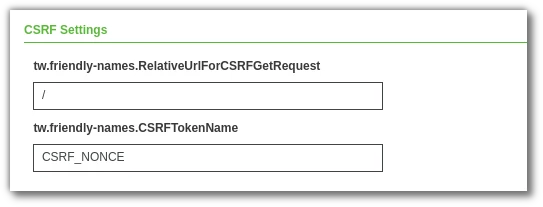
PDMLink's REST API is protected of CSRF attacks, so you have to use a  specific header in the request.
Only the POST requests, GET requests don't need it.

I thought that the connector's CSRF settings would do this, but it doesn't
Sélection_012.png

I checked the network exchange with wireshark, no CSRF token.
So it fails...
Now I need to find how to set this token, maybe in the GetCustomHeaderParameters, but I need to make a call to PDMLink to retrieve the token !


11 replies

16-Pearl
August 16, 2018

Hello

I am trying the same configuration for ODataConnector, and I learned that a Javascript is required to set wt.effectiveUid (or else there is no remote user, and you get code 403). In the GetCustomerHeaderParameters service on the connector, add this script:


var sessionQueryParam = "wt.effectiveUid";
var Language = Resources["CurrentSessionInfo"].GetCurrentUserLanguage();

var params = {
infoTableName : "InfoTable",
dataShapeName : "NavigateCustomHeadersDataShape"
};
var result = Resources["InfoTableFunctions"].CreateInfoTableFromDataShape(params);

var CurrentUser = Resources["CurrentSessionInfo"].GetCurrentUser();

params = {
tableName: "GenericConnectorConnectionSettings" /* STRING */
};
var configTable = me.GetConfigurationTable(params);

var row = configTable.getRow(0);
var authType = row.getStringValue("AuthenticationType");

if("None".equals(authType)) {
var camelHttpQuery = sessionQueryParam + "=" + CurrentUser;
row = {"Accept-Language" : Language, "CamelHttpQuery": camelHttpQuery };
} else {
row = {"Accept-Language" : Language };
}

result.AddRow(row);


With this addition, I am able to successfully execute the ValidateConnection test. I am working now on issues with the GetEndpointList service, but I get authenticated.

16-Pearl
August 20, 2018

Follow up:


Setting Relative URL to: /servlet/odata/IE restricts the connection to the IE endpoint. Using /servlet/odata will allow access to all endpoints.


You also need Windchill 11.0 M030 to be patched to at least CPS06 for the REST services to be up to date. Remember that you need to re-apply the Windchill Extension for Navigate after completing the CPS patch.

15-Moonstone
August 20, 2018

Hi,

My version is

M030-CPS08

Not sure my rest module is up to date...
M010        1.0             odata.1.0.10.00.10              01         windchill 1.0 REST Services


I tried servlet/odata but it's not working.


[https://kora.4cad.fr/Windchill/sslClientAuth/servlet/odata/$metadata?wt.effectiveUid=Administrator] with status [ - Invalid domain request]

However, GetEndPointList works... in the new composer 🙂


Sélection_045.png