
1-Visitor
May 11, 2017
Question

How to overlay indicator over the image

  • May 11, 2017
  • 8 replies
  • 4915 views

Hi all,

     I want to overlay the condition indicator over the floor plan image. I searched in the forum that if I want to overlay something on the image, I should put the panel first then put the image over the panel, then other widget can overlay on the image. I tried this. The problem is, 1) the image over the panel will show differently in different resolution screen. So I think the image over the panel may not be a good solution. 2) There is no indicator widget in the library. How can I manage to do this?

    Thanks!

     IWeChat Image_20170511102218.png
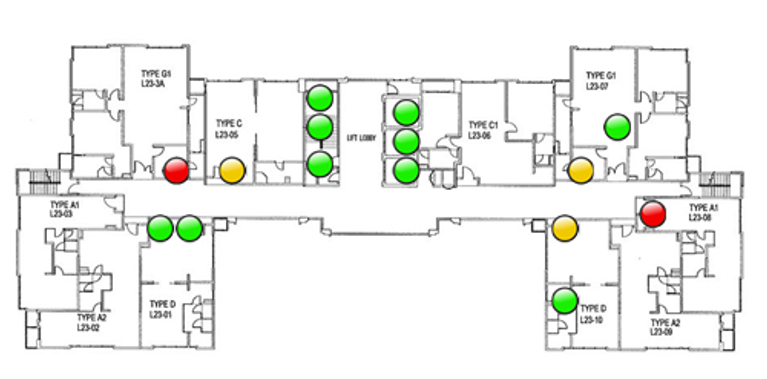
8 replies

1-Visitor
May 11, 2017

Hello,

you can place an Image widget in the panel. The image size can be fixed in this way. Then you can place other Image widgets as indicators on the image of the floor plan

tguo1-VisitorAuthor
1-Visitor
May 12, 2017

But I want to let image to suitable to different screen size:

If I choose to let image in the panel suit the 1024*768,

will like this:

1024×768.png

1280*1024 will like this:

1280×1024.png

1366*768 will like this:

1366×768.png

My concern is: if I place other image over this image in the panel, the image effect will be affected by the screen size.

1-Visitor
May 11, 2017

Hi,

It is not possible to overlay widget without panel in mashup.

For indicator use can use shape widget and set shape type as Circle. For different colour use can use state formatting based on Data.

You can increase Z-index for shape to overlay over plan floor image.

Regards,

Vel

tguo1-VisitorAuthor
1-Visitor
May 12, 2017

Thanks for your response. But how to let the panel be responsive in different screen size?

1-Visitor
May 12, 2017

Hi,

Try to use static mashup. In static mashup, set "master" background as Plan floor image and place indicator(Shape) over that.