14-Alexandrite
January 31, 2023
Solved

How to show multiple temperatures in the same line chart widget in ThingWorx (version 9.3)

  • January 31, 2023
  • 1 reply
  • 3403 views

Hello,

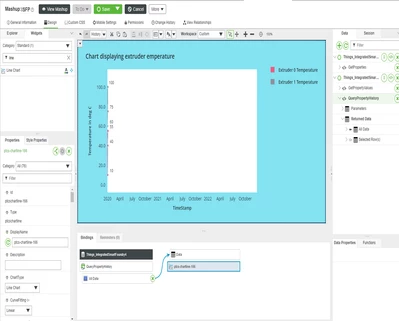
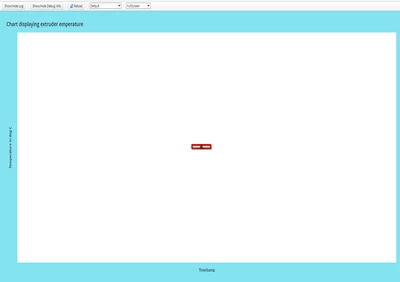
Line charts cannot be displayed in the mashup with respect to date and time even if it is designed according to PTC guide as a reference. Below is the example to display the temperature with respect to present date and time and how it is binded with and the result after saving the mashup is displayed as an error in the next image


NH_shree_0-1675155486008.png

NH_shree_1-1675155519330.png

•The Date/Time Property is not considering the Present date time and year , even if we set the Property to the today’s date and save it and once if we refresh the page by default it will take it as 1970 /01/01 . IT is shown in the below image

NH_shree_2-1675155660918.png

please help to get the proper line chart with respect to time and date. 


Best answer by jensc

Hello,


If you want to show multiple temperatures in the same line chart widget, you can use a thing service where you get all of your temperatures and put them all in the same infotable.

Start with creating a data shape containing a date and your temperatures.

Something like this:
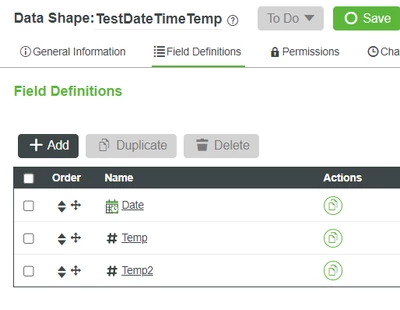
jensc_0-1675255339019.png

Then in your service you would first have to use the QueryPropertyHistory function for each of your properties.

Once you have them you would have to map your history values to the new infotable.


Here is some example code how you could do it, however I need to point out that if you have a lot of history data, this is not optimal as we are looping a lot.

// CreateInfoTableFromDataShape(infoTableName:STRING("InfoTable"), dataShapeName:STRING):INFOTABLE(TestDateTimeTemp)
let datetimetemp = Resources["InfoTableFunctions"].CreateInfoTableFromDataShape({
 infoTableName: "InfoTable",
 dataShapeName: "TestDateTimeTemp",
});
const temp = me.DateTimeTempTest;
const temp2 = me.DateTimeTempTest2;
// TestDateTimeTemp entry object

temp.rows.toArray().forEach((temperature) => {
 let newEntry = {
 Date: temperature.Date, // DATETIME
 Temp: temperature.Temp, // NUMBER
 };
 datetimetemp.AddRow(newEntry);
});

temp2.rows.toArray().forEach((temperature) => {
 let newEntry = {
 Date: temperature.Date, // DATETIME
 Temp2: temperature.Temp2, // NUMBER
 };
 datetimetemp.AddRow(newEntry);
});

result = datetimetemp;

The code basically just creates an empty infotable using the data shape we created earlier and fetches two properties (with dates and temperatures in them). You would use the QueryPropertyHistory instead.

And then we loop though each of these properties (history) and adds each row to the infotable that will contain all values.


You can then use this infotable as your output and connect it to your line chart like this:
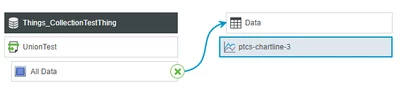
jensc_1-1675257177485.png

Where "UnionTest" would be the name of your service and:

jensc_2-1675257204227.png

The XAxisField is set to your date.


This should give you something like this:
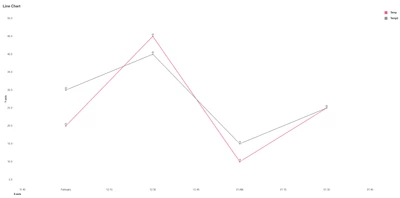
jensc_3-1675257245760.png

Obviously it would look a bit different for you. But in general it should work like this.


I'm not quite sure what your issue is with the date time though... Where are you getting this 01/01/1970 date?


Regards,

Jens

1 reply

17-Peridot
January 31, 2023

Hello,


I just made a quick test and you might want to reduce the max date range for your x-axis:

jensc_0-1675167564193.png

This will better show your temperatures.


Also, make sure that your X-Axis type is set properly:

jensc_2-1675167927107.png


When it comes to the error, this is most likely due to an issue with the service. If you open your developer console (f12 in chrome) and look under the "network" tab after a refresh of your mashup you should see your service "QueryPropertyHistory" as red.

If you press that and look under the "Response" tab you should be able to see some error message.


Also, I'm not sure if the "QueryPropertyHistory" is able to be used as you are trying to use it.

If you could screen cap the service like this:

jensc_1-1675167857573.png

To see if the "All Data" infotable actually contains your values or not.

It looks like perhaps it doesn't contain all the data you need.


This is an infotable property I just made "DateTimeTemp":

jensc_3-1675167991941.png

However as you can see I am using the "GetPropertyValues". So this service would only retrieve your current  values.

You might have to create your own service where you build an infotable output from your property history.


Regards,

Jens

NH_shree14-AlexandriteAuthor
14-Alexandrite
February 1, 2023

Hi ,

If i want to get the real time line graph then how can i use infotable for all the properties which i want to use ?

For example i want to display a temperature graph with respect to time , there will be four temperatures which i have to display suppose for example tell them as  bed temperature, extruder temperature,  furnace temperature, Heater coil temperature properties.

Then How can i use the infotables in this case ?


NH_shree14-AlexandriteAuthor
14-Alexandrite
February 1, 2023

Hello ,

Here are some snaps after using "getpropertyvalues ", here i have sensor logged data of dht i.e., temperature and humidity 

but the graph looks like it is showing me only one data at a time that too if use timestamp then it gives me an error

NH_shree_0-1675252150300.png


and if i use the info table then i get the line graph but only for the data which i give it will plot for that as shown below

NH_shree_1-1675252316032.png

and i have checked in chrome (f12) regarding any error message for "querypropertyhistory" service and i am not finding any problem in it , the issue is with date and time because it takes the old datetime as 01/01/1970 the graph is not appropriate to use. IS there any solution please let me know so that i can work on it further.


Regards,

Shree