
1-Visitor
November 8, 2017
Question

Network error with Thingworx Analytics server URL

  • November 8, 2017
  • 1 reply
  • 10020 views

Hello everyone,

I have installed Docker community edition with version 17.06.2-ce-win27  on windows 10 desktop grade machine.

Then docker based analytics server with version 8.0   is installed on that.

after installing docker analytics server URL also generated.

http://10.0.75.1:8080/analytics/1.0.

after running URL,getting below error.
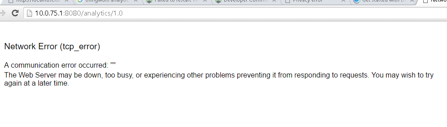
can any one help on that.

Regards,

Raji

1 reply

5-Regular Member
November 8, 2017

Hi Raji Vuta

Could you please check in docker settings that your all the drives are shared or not. For windows 10 we use the native docker make sure you are using the same not docker toolbox. Please see the below screenshot for the same.

Please send me the result of these commands in docker terminal: 1) docker ps -a  2) docker logs analytics

Regards,

Mohit Goel

rvuta11-VisitorAuthor
1-Visitor
November 8, 2017

Hi Mohit,

Thanks for your response.

Please check below screenshots of commands.

docker logs analytics

docker ps -a

5-Regular Member
November 8, 2017

Hi Raji Vuta

Please check both c and d drive in the settings share drive option and follow the below article, hopefully it will help.

https://www.ptc.com/en/support/article?n=CS265097&posno=1&q=Error%20%22This%20page%20cannot%20be%20displayed%22%20is%20received%20when%20accessing%20about%2Fversioninfo%20API%20in%20ThingWorx%20Analytics%20Server%208.0&source=search

Do let me knoe in case of any question.

Regards,

Mohit Goel