Hi @MA8731174
If your company already owns an entitlement to ThingWorx, you can run as many non-prod instances as needed. That includes setting up your own instance for the reasons you mentioned, as well as instances to be used for Development, Testing, etc. without the need for additional licenses.
I'm checking to find out what is available to customers in our Cloud portal, but there may be a charge for that.
You can install your own instance locally. To get started, you'll first need to determine which version of ThingWorx you're installing. I assume you will want to install the version your company is running in production. Assuming it's 9.4 or higher, you can download the software from the Downloads page on the PTC Support portal. (Note, the Help Center no longer contains documentation for 9.4, so I would avoid that one if possible.)
Before downloading, you'll need to decide which database to use: PostgreSQL or SQL Server (mssql). Expand the link for the db of your choice:
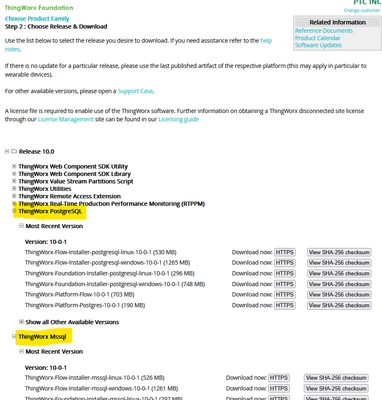
Then click the HTTPS link for the desired download. I recommend selecting the Foundation Installer version for the operating system you plan to run on. Here's a link to the Help Centers where you can find the installation instructions.
Before you begin the installation, check the Release Advisor for all system requirements. You'll have to download the supported versions of Java (make sure it's the JDK) and the database at a minimum. If you decide you want to tackle a manual installation, you'll also have to download Apache Tomcat. Even though the support matrix does not list the user-based Windows versions as supported operating systems, many of us run ThingWorx on our laptops without issue. For your purposes, that should be fine. Note: it's never recommended to run a production system on an operating system that is not designated in the support matrix.
Hopefully, this will help you to get started. If you have any questions, please let me know. In the meantime, I will try to get an answer regarding a cloud-hosted instance that you can use.
Regards.
--Sharon

