
1-Visitor
September 29, 2016
Question

Responsive mashup using list widget to control

  • September 29, 2016
  • 1 reply
  • 2088 views

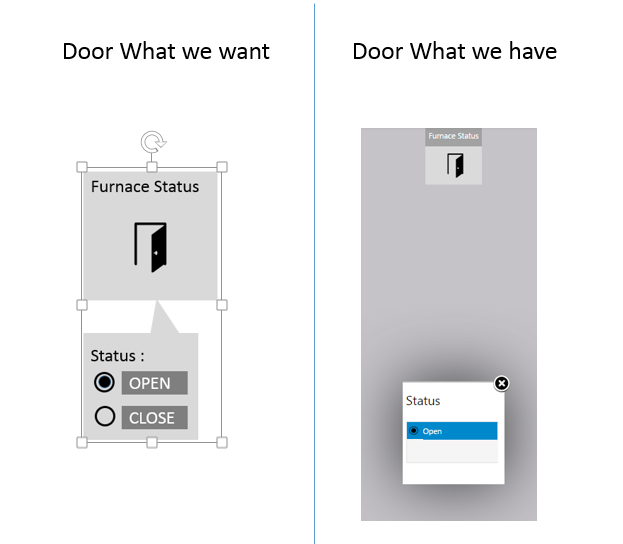
I am simulating data for a door(open/close) where I am using list widget( radio button). in the mashup, I am able view the current simulated value coming from edge micro server, but cannot view the other status/value (eg: if door status is open, the radio button displays only open and the close status is not visible).

So, is there a way where I can view both the status. In the further step I would also like to control the status, so if current status is open then I would like to change the door status to close by clicking the close radio button (I am vaguely aware about the usage of “set service” but it would be great if I can have a broader perspective of this service in this case).

Kindly find the attachment to have better clarity on door issue.
door2.png

Thanks,

Amrutha

1 reply

1-Visitor
September 29, 2016

Hi,

It seems your text style it's white, that's the reason why you don't see Close text, you should change ListBox Style properties .

Carles.

ar11-VisitorAuthor
1-Visitor
September 29, 2016

Hi Carles,

In that case the 'open' status also should be invisible, isn't it? When I'm simulating 'close' as the status, that is the only status visible.

So, for now I am creating an infotable with one field definition containing 2 values in it, open and close. I have mapped this to a list widget with radio button option. Now I'm able to see both the status on the list.

What I'm trying now is that on clicking any of the status(open/close) i would like to view that on my EMS code console. I am trying 'setproperties service' from the mashup and 'getproperty' from the EMS but not getting any closer. It would be great if any one could help with with a solution.

Thanks,

Amrutha

1-Visitor
September 29, 2016
  1. Mashup: On Selected Row change, you should trigger another service which receives the selected row value and sends it to the server
  2. Server Side
    1. You should have either a Remote Property o Remote Service
      1. If you where able to receive the Remote State of the door, you should be able to do the other way around
    2. From the previous service you just need to change the remote property or call the remote service with the new value