
March 20, 2017
Question

Thingworx Composer return HTTP Status 401 - Could not handle request

  • March 20, 2017
  • 2 replies
  • 13914 views

Hi All,

today I installed on my PC Oracle Client 12.0 and then I uninstalled it.

After that I started Tomcat and I'm connect to Composer in local thingworx instance, the url returned the following message :
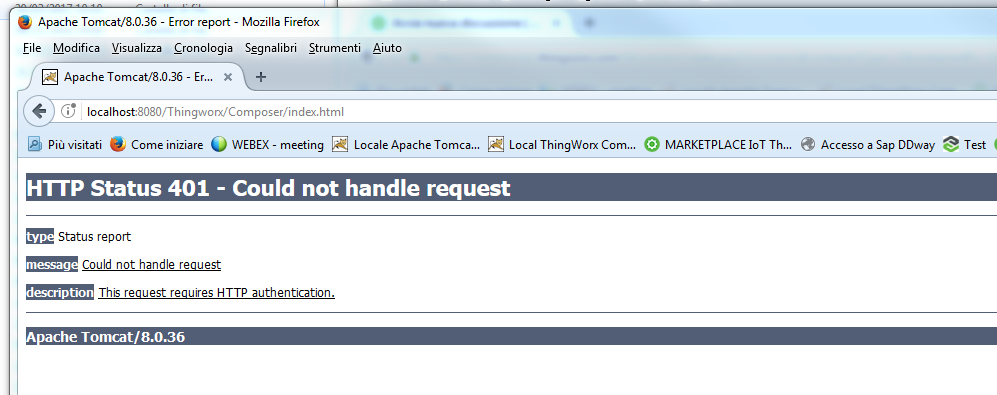
I'm not requested to enter the login/password andf the url returned the page before.

Any suggestion .. I would like to avoid to reinstall all the environment.

In case I have to reinstall  how canI restore data (stored in neo4j).

Is it possibile afther the new installation to link the old db ?

Many Thanks

BR

Dimitri

2 replies

5-Regular Member
March 20, 2017

Hi Dimitri, what's the error message in the tomcat's catalina log? is the Tomcat running while you get that error? You might want to confirm if somehow the Java settings are changed/updated for the Tomcat after you uninstalled the Oracle client.

Edit:

Could you please attach the Tomcat to your reply.

March 20, 2017

Hi Sushant,

The catalina log contain the following critical row

FO [main] org.apache.catalina.core.AprLifecycleListener.lifecycleEvent The APR based Apache Tomcat Native library which allows optimal performance in production environments was not found on the java.library.pa ...........

How can I restore the 'APR based Apache Tomcat Native library'  ?

Where I found these libraries and where I copy their ?

BR

Dimitri

20-Turquoise
March 20, 2017

Could you please post the whole contents of the log? What operating system is it?

The native lib is expected in one of the following locations:

/usr/java/packages/lib/amd64

/usr/lib64

/lib64

/lib

/usr/lib

You could download the native library appropriate to your platform here Apache Tomcat Native Library - Documentation Index

And then place it in one of the above mentioned locations.

20-Turquoise
March 20, 2017

Could you please verify that your Tomcat java path is set to (with your own java version):

Java\jre1.8.0_121\bin\server\jvm.dll

March 20, 2017

Hi Polina,

the path is correct

BR

Dimitri