10-Marble
October 26, 2022
Solved

Add HTML attributes to widgets

  • October 26, 2022
  • 1 reply
  • 2442 views

Hi everyone

How can i add ID to a button ?

I know about the widget ID, but I'm referring to ID that I can call from css with #ID.

It doesn't work with widget ID because it's not visible in html code.
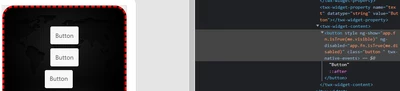
Pietro_Padovan_2-1666772305469.png


#btn
{
 background-color: green;
}


This is the result if I manually add the ID attribute from debug mode
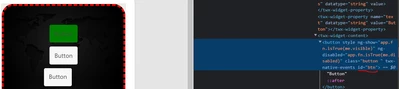
Pietro_Padovan_1-1666772176160.png


Best answer by ClayHelberg

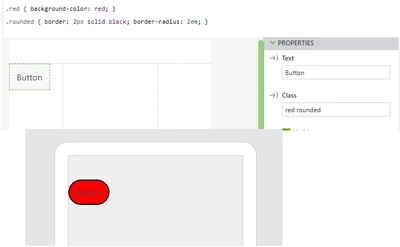
Yes, you can do exactly that, except use a space-delimited class list instead of commas. So the Class parameter should be "GENERAL green" to attach both the GENERAL class and the green class to this object.

ClayHelberg_0-1668198095178.png


1 reply

21-Topaz I
October 26, 2022

Hi @Pietro_Padovan ,

is there special reason, goal what you need to achieve to use this way. The default usage here is to create a style in the application section and to set to class property via assignment or with javascript .

Here example in the Studio Help for button

http://support.ptc.com/help/vuforia/studio/en/#page/Studio_Help_Center%2FWidgetButton.html

or label

http://support.ptc.com/help/vuforia/studio/en/#page/Studio_Help_Center%2FWidgetLabel.html

You can also use in the class button also one of the predefined classes e.g. button-calm or button-assertive etc. as defined in configuration>Themes tab.


10-Marble
November 2, 2022

Hi Roland
I create a class with animations when click, hover and active the button.
Two button, START and X (to close the windows) I would like to have different animation (they have to become red).
I thought to use the ID to change the color for these specific buttons.

Can I use ID to change the button style?
Otherwise is possible to link two or more class for one object? In this case, which one has priority?

21-Topaz I
November 4, 2022

Hi @Pietro_Padovan ,

I think this should be possible if I correctly understood your requirements. Here is an example where when you click on element (here on 3DImage widgets) the js callback will change the style of the button. The style definition are loaded externally from upload folder in this example but it will be the same (no difference for the js code) if the styles are defined in the Application.scss tab. In this case the loading of the style def is not required

2022-11-04_10-37-17.gif

The setting is simple 2 function :

///////////////////////////////////////////////

//$scope.cnslTxtIntl = val => console.log(val);
$scope.test=function() {
 
 //setting here the class properties of the buttons- definition in test.css
 $scope.setWidgetProp("button-1","class","button-2");
 $scope.setWidgetProp("button-2","class","button-1");
//set the style attributes for the 3DGauge - effect similar to class setting 
 $scope.setWidgetProp("3DGauge-1","textattrs","fill:rgba(0, 0, 255, 1);textbaseline:top;textalign:left;font-size: 40px;stroke:green;colostroke-width: 3px;");
 $scope.setWidgetProp("3DGauge-1","font","Arial");
$scope.setWidgetProp("3DGauge-1","fontsize","30px");
 $scope.$applyAsync();
};

//-----------------------------------------
$scope.test1=function(my_string) {
 
 //setting here the class properties - definition in test.css
 $scope.setWidgetProp("button-1","class","button-1");
 $scope.setWidgetProp("button-2","class","button-2");
 $scope.setWidgetProp("3DGauge-1","textattrs","fill:rgba(255, 0, 0, 1);textbaseline:top;textalign:left;font-size: 40px;stroke:black;colostroke-width: 3px");
$scope.setWidgetProp("3DGauge-1","font","Courier");
$scope.setWidgetProp("3DGauge-1","fontsize","60px");
$scope.$applyAsync();
};

I attached also the project if you want to test it first. Please, let me know if this is helpful to achieve your goal or if you need further information.