1-Visitor
February 25, 2021
Solved

Changing Service parameter with buttons

  • February 25, 2021
  • 1 reply
  • 2292 views

Hi everyone,


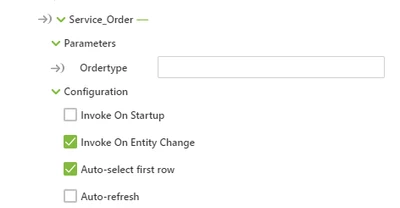
On Thingworx I created a Service. "Service_Order", which needs one Input to execute. But how do I define this Input in Vuforia?

I would like to change the parameter "Ordertype" of my Service with a button click.

So when I press a button I would like to write "WHITE" into this parameter and by clicking another button I would like to change the text to for example "RED".

DF_9703795_0-1614275374438.png

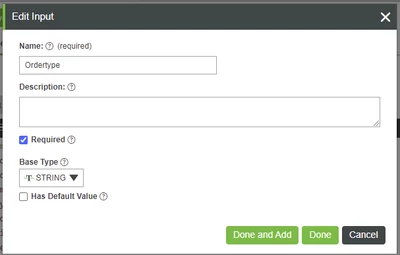
Additional I only want to execute this service, when clicking on the buttons. At the time the Service is executed, when starting the preview and it ignores that the parameter "Ordertype" is empty. But at Thingworx I enabled the checkbox "required". So it shouldn't execute the Service without an Input, right?

DF_9703795_0-1614277497396.png


Thanks for any kind of help!

Best answer by RolandRaytchev

Hi @DF_9703795 ,


I think the problem you have that it always call you service on start -  is because you selected the - are the 2 selected checkbox on the service configuration. So far I understood your issue , you want to call the service form Vuforia Studio and to send parameter to thingworx.

Using only the UI functionality you can simple link the button click event to the service arrow   and link the value which should be sent t to the service parameters. The value could be a value of label  widget (also it could be blanked)  or application  parameter . Possibly you need to use a filter for the binding  - so you can   convert the value  if other type as string is required for your TWX method. Here in the sample picture above the value of a toggle is linked to the parameter and the serivce is called by the button click event:
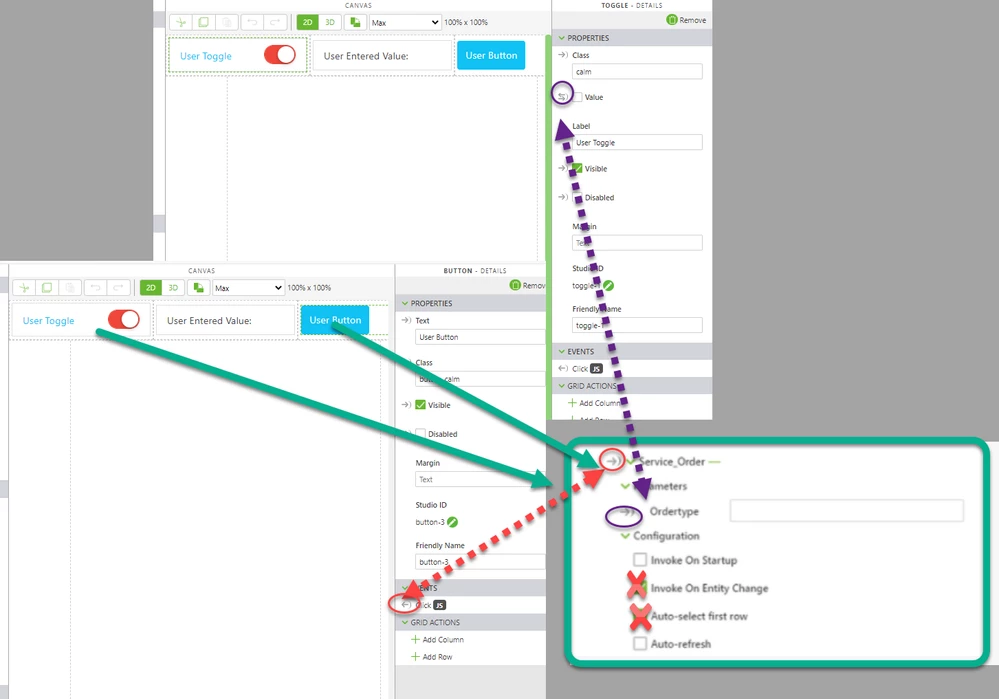
2021-02-26_17-24-28.png

Another option is to use a javascript method to call your TWX service (also with JS the service should be added on the External data section). You can use the method triggerDataService() to call service in TXX. Here is example:


//////////////////////////////////////////////////////////////////////////////////
$scope.testMdl=function () 
{

//console.warn($scope.app.mdl['Car1'].svc['GetMetadata'].data);
 var viewName ='Home'
 var widgetId= 'model-1'
 var target = document.querySelector('[widget-id="' + widgetId + '"]');
 var serviceName='test'
 twx.app.fn._triggerStudioEvent(target, 'app.view["'+viewName+'"].wdg["'+widgetId+'"].svc.'+'play'); 
 $scope.testString("bla="+ 5*global_value++)
 
 twx.app.fn.triggerDataService('Car1','GetPropertyValues',"{data:{\"property\":\"RPM\"}}")
}


In this example we will call the GetPropertyValues service for the Thing 'Car1' and will set one argument  named "property"      - there we  will pass the string "RPM"

Helpful info related to your issue, you can find in the posts:

https://community.ptc.com/t5/Vuforia-Studio/How-to-execute-service-based-on-change-in-current-selection/m-p/669826#M8337

and 

https://community.ptc.com/t5/Vuforia-Studio/Displaying-information-based-on-property-value-in-Vuforia/m-p/661852


 

1 reply

21-Topaz I
February 26, 2021

Hi @DF_9703795 ,


I think the problem you have that it always call you service on start -  is because you selected the - are the 2 selected checkbox on the service configuration. So far I understood your issue , you want to call the service form Vuforia Studio and to send parameter to thingworx.

Using only the UI functionality you can simple link the button click event to the service arrow   and link the value which should be sent t to the service parameters. The value could be a value of label  widget (also it could be blanked)  or application  parameter . Possibly you need to use a filter for the binding  - so you can   convert the value  if other type as string is required for your TWX method. Here in the sample picture above the value of a toggle is linked to the parameter and the serivce is called by the button click event:

2021-02-26_17-24-28.png

Another option is to use a javascript method to call your TWX service (also with JS the service should be added on the External data section). You can use the method triggerDataService() to call service in TXX. Here is example:


//////////////////////////////////////////////////////////////////////////////////
$scope.testMdl=function () 
{

//console.warn($scope.app.mdl['Car1'].svc['GetMetadata'].data);
 var viewName ='Home'
 var widgetId= 'model-1'
 var target = document.querySelector('[widget-id="' + widgetId + '"]');
 var serviceName='test'
 twx.app.fn._triggerStudioEvent(target, 'app.view["'+viewName+'"].wdg["'+widgetId+'"].svc.'+'play'); 
 $scope.testString("bla="+ 5*global_value++)
 
 twx.app.fn.triggerDataService('Car1','GetPropertyValues',"{data:{\"property\":\"RPM\"}}")
}


In this example we will call the GetPropertyValues service for the Thing 'Car1' and will set one argument  named "property"      - there we  will pass the string "RPM"

Helpful info related to your issue, you can find in the posts:

https://community.ptc.com/t5/Vuforia-Studio/How-to-execute-service-based-on-change-in-current-selection/m-p/669826#M8337

and 

https://community.ptc.com/t5/Vuforia-Studio/Displaying-information-based-on-property-value-in-Vuforia/m-p/661852