
12-Amethyst
December 30, 2016
Question

Display sequence step names from Creo Illustrate

  • December 30, 2016
  • 11 replies
  • 17997 views

This example briefly describes how you can use the Step names that you used in Creo Illustrate sequence definitions to drive a corresponding step instruction/description in your experience. This is an unsupported, preliminary solution - R&D is working on a better, final solution. But as long as this is not available, you can use this one for PoC and demo purposes.

To setup the scene: Here is what I meant with Step names that you used in Creo Illustrate:
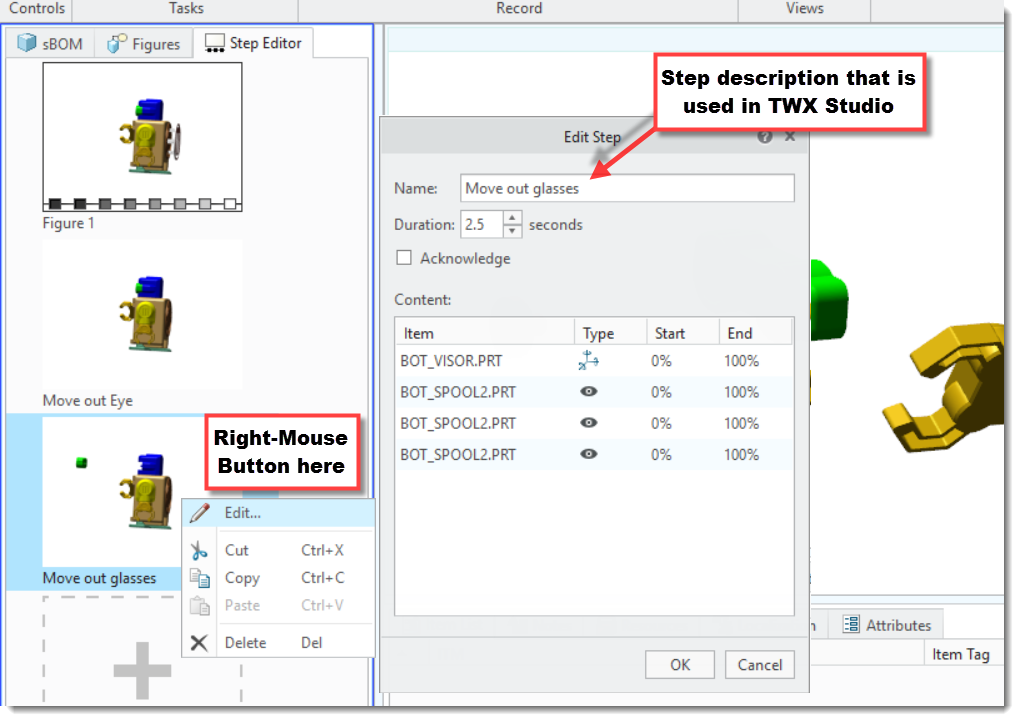
StepDefInIllustarte.png

Now in Thingworx Studio you want to have the following result:
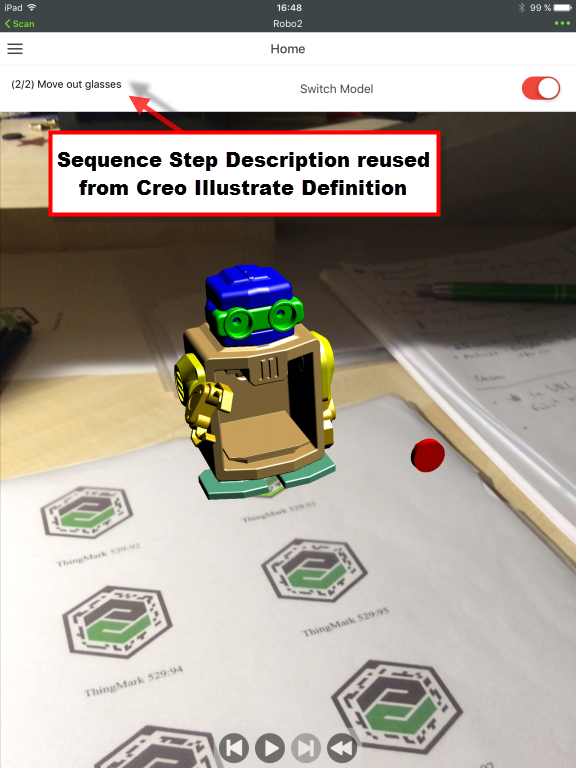
SequenceStepInView.png

The text is rendered with a simple Label widget. You'll have to remember the ID of this widget for the following javascript tweak. Add the following text to the Javascript section of your View:

var labelId = "label-1"; // ID of the Label widget that displays the Step progress and description  text

// this $on event handler switches the label based on the the sequence definition

// the arg variable is of the following form: (<step #>/<total step #) <step name>

$scope.$on('newStep', function(evt, arg) {

  $scope.setWidgetProp( labelId, "text", arg); // get the currentStep from the arg

});

Now you only need to provide the correct initial value in the Label widget text property and add control widgets (Buttons, Playback) to drive your animation and you're done.

Easy!

11 replies

10-Marble
May 19, 2017

Thank you  Moritz von Hasselbach. The code works .

But  when Creo Illustrate step names inclsude Chinese character,In ThingWorx Studio preview, Chinese characters can not be displayed properly.

snapshot20170519092356.png

11-Garnet
July 7, 2017

Hi Moritz,

How to write a Java script so that a label gets the description of a particular step only when it plays

Regards

Suresh

14-Alexandrite
August 11, 2017

Hello Moritz,

this is great tutorial. Thank you much. I have two additional questions:

1/ Is possible to show only Step name?

2/ How to show Step description?

step_info.png

Thank you for your time.

Regards

Tomas

16-Pearl
August 17, 2017

Hi Moritz,

As per the previous two comments, I'd also like to know if there is a way to extract out the step description.  If I follow your example, the label shows (<step #>/<total step #) <step name>:

Clipboard01.png

As Thomas showed in his previous post, in Creo Illustrate, you would type in detailed information in the notes tab which in the PVI file is stored as step_decription.

If found that in the sequence.js file in the project folder, the function SequenceStep(step) gets the following properties:

  • step_name
  • step_duration
  • step_acknowledge
  • step_description

And in the vuforia-angluar.js file, there's the definition of the newStepEventArgument that is set to (current step / total steps) step name.

So the question is, how to we extract out the information like step_description into the label text?

Many thanks,

Allan

1-Visitor
August 17, 2017

Hi, Let me know if there are any chance to bring the step_description from Creo Illustrate

Regards,

Thadeus.D

17-Peridot
September 25, 2017

Same request / goal here - would be nice to have the way to get the data from the steps' notes.

1-Visitor
October 30, 2017

Thanks a lot

1-Visitor
June 20, 2018

Hi Moritz,

Good day!

I would like to know, how to display only "step name" in my vuforia studio?

Currently it is showing like this "1/11 Step name". But what I want is only "Step name" to be seen.


Thank you!


12-Amethyst
July 25, 2018

You can cut of the first part e.g. '( 1/11)  ' with a regexp  so that you end up with just the title.

The code snippet would look like this:

var labelId = "label-1"; // ID of the Label widget that displays the Step progress and description text
// this $on event handler switches the label based on the the sequence definition
// the arg variable is of the following form: (<step #>/<total step #) <step name>
$scope.$on('newStep', function(evt, arg) {
 var arg2 = arg.match(\(\d+\/\d+\) (.*))[1];
 $scope.setWidgetProp( labelId, "text", arg2); // get the currentStep from the arg
});
1-Visitor
July 30, 2018

Hmm... It gives me an error. 

a4485855-4e5b-42bc-be63-65572c05000e.png

1-Visitor
July 12, 2018

Hey there, 


is there any new possibility to use the step notes in studio? 

16-Pearl
September 3, 2018

Note: if "Allow download for offline viewing" is activated, it won't run properly in offline mode. You might need to change

$scope.setWidgetProp(labelId, "text", arg)

into

$scope.view.wdg['labelId']['text']=arg;

I don't know why, but it worked for me.