How to Check Polygon count in Vuforia Studio
How can see number of polygon in my scene ? I remember some number shown on right bottom while in preview mode, but now I can't see it.
Any idea how to enable it.

How can see number of polygon in my scene ? I remember some number shown on right bottom while in preview mode, but now I can't see it.
Any idea how to enable it.
Hi
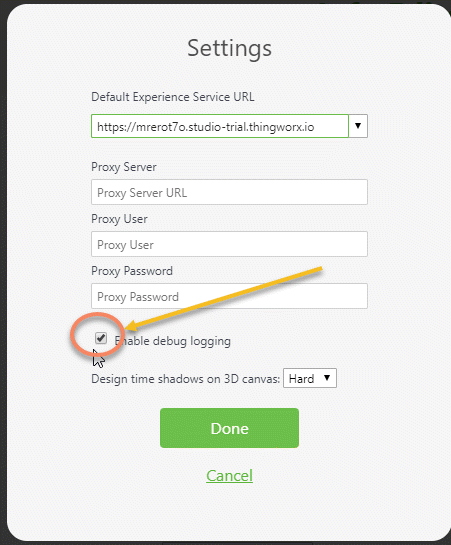
in Studio you can set the debug logging:
The Scene polygon count is displayed when Vuforia Studio >Settings >Enable debug logging, is enabled

If you want to check this also in Creo Illustrate - you review this How to count number of polygons in a pvz file
Also, the debugging logging you can set by editing of the builder-setting.json file and add
"enableDebugLogging": true
But , please, pay attention to create first a backup of this Documents/VuforiaStudio/builder-settings.json , set then the option and restart studio.
But the effect is the same as if you do this with UI therefore is this not recommended
No account yet? Create an account
Enter your E-mail address. We'll send you an e-mail with instructions to reset your password.