Hi @JTFrandsen ,
I think the bounding boxes of 3D parts/components could be passed to Studio metadata but this is something what is not possible to be achieved by default in the current functionality - so far I know and so far I understand the current functionality after some more detailed check.
Here is an example what currently the meta data of specific pvs /PVZ component will contain:
...
,"/0/0/1/1/11":{"":{"Feature_Id":"74","Source_file_name":"main_bearing.prt.3","Source_part_name":"main_bearing_mid.prt"},"PROE Parameters":{"COST":"0.000000","DESCRIPTION":"Bearing, Main","DESIGNER":"J Buch","MATERIAL":"Steel","PART_NUMBER":"000-000-000","PDMDB":"ProEngine","PDMREV":"1.10+","PDMRL":"WIP","PTC_MATERIAL_NAME":"STEELMMNS","VENDOR":"PTC","WEIGHT":"0.000021"},"__PV_SystemProperties":{"Child Count":"0","Component Name":"MAIN_BEARING_MID.PRT","Display Name":"MAIN_BEARING_MID.PRT","Model Extents (mm)":"55.5","OL File Name":"l-Creo 3D_0_l-Creo 3D_0_proengine_9.ol","Part Depth":"6","Part ID":"11","Part ID Path":"/0/0/1/1/11","Part Name":"MAIN_BEARING_MID.PRT","Part Path":"Illustration/Illustration/ENGINE.ASM/ENGINE_BODY.ASM/CYLINDER_BLOCK.ASM/MAIN_BEARING_MID.PRT"}},...
We can see that all PROE parameters are comming (in case that the source CAD system is Creo Parameteric). The only geometrical property what we could see is the extend attribute.
.... But the data is there -> here for example when we open a PVZ file in Creo View (MCAD license) and check the component properties:
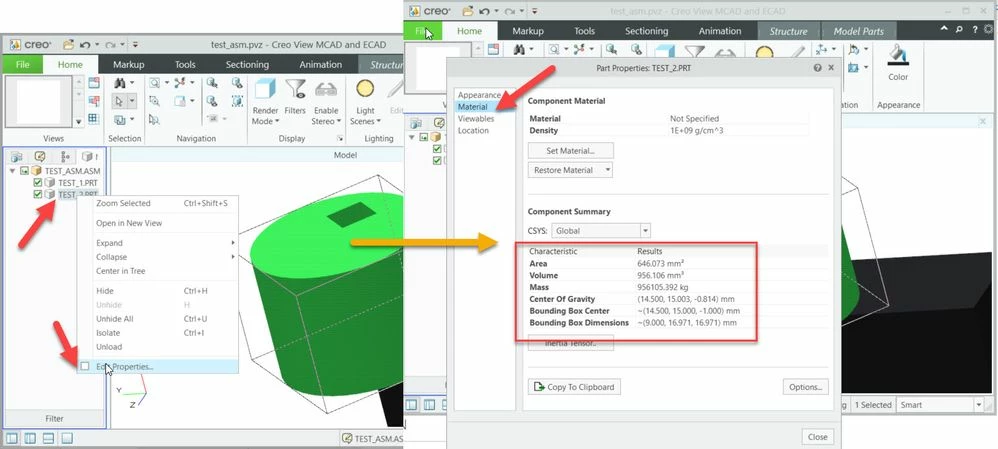
So, we can find for each component the center of gravity and the bounding box information.
Possibly we can have soon this information also in the meta file when we load a file in Studio with the option to create a json meta file. I will check with dev team if such configuration could be setup in the current release / R&D reference VTS-719/ .
if this is not possible then I think we have the following options:
- write information to xml and add it as property to pvs via the Creo view adapter as documented in:
Advanced PVS Optimize Utility Configuration
http://support.ptc.com/help//creo/view/r8.0/en/index.html#page/creo_view%2Fadapter_install_config_guide%2FConfig-PVSChange%2FPVSChangeConfigAdvanced%2FAdvanceViewCompressUtilityConfig.html%23
Using the PVS Optimize Utility to Add Attributes to PVS Files from XML input
http://support.ptc.com/help//creo/view/r8.0/en/index.html#page/creo_view%2Fadapter_install_config_guide%2FConfig-PVSChange%2FPVSChangeConfigAdvanced%2FAdding_Attributes_to_PVS_Files_through_pvschange.html%23
Advanced Recipe Configuration for PVS Optimize Utility
http://support.ptc.com/help//creo/view/r8.0/en/index.html#page/creo_view%2Fadapter_install_config_guide%2FConfig-PVSChange%2FPVSChangeConfigAdvanced%2FAdvanced_Recipe_Configuration_for_PVSOptimize_Utility.html
The problem here is that in this case we need to extract the information . The trivial case to read the info and write down to a xml file if we have an assembly with few parts.
In case that the parts are coming form Creo Parametric we can use Creo Parametric Toolkit (requires dev license) or JLink(does not require dev license) to visit the Root assembly tree and for each component to extract the bounding box information , center of gravity ... etc. and then to write these information
- into a xml file to be imported later via the Creo View adapter XML interface as mentioned above or
- to create Creo Parametric parameters which will contains these values. In this case the parameters will be available in the meta data.


