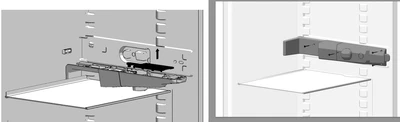
shadow areas appear grey
As per this topic:
Hi Tara, As far as I understand the issue - it's born in the Light scenes, where shadow areas appear grey.
We facing the same issue in Creo Illustrate - and looking for a light scene that I can adjust the lights are best for the used figure.
But just switching from headlight to 1,2 or 3 light - making not the bis diffrence.
I would be more convinced if the light scene can really adjusted by placint the light.
Do you also consider this way?
But this article belonging not to creo Illustrate - I will create an Idea to get this adressed at the right topic.
Regards
Robert
E.g. even that the left figure is not identical - the grey colored fridge frame is white, but appear due to light sceene grey. The right figure showing the expected result we want to achieve.