17-Peridot
Oct 23, 2023 6:06 PM UTC
Solved

Autoassociate CAD to WTPart soft type

There was a thread on this from ~10 years ago (here) and I'm sure things have changed for the better since then. 


Is there a way to autoassociate CAD to a soft type of a WTPart in certain contexts? 

I have 2 subtypes of WTParts and one is set as the default on CAD associations. 

In one context, I want the other one to be the only WTPart type going in. I tried adjusting the preference for that context (Operations/General/Custom Modeled Part Class and added my WTPart internal name there) and I tried adjusting the OIR to enable only the subtype I want AND in the OIRs calling out wt.part.WTPart|my custom part internal name. Still, it auto-associates to the default. 



HelesicPetr
22-Sapphire II
Oct 24, 2023 7:52 AM UTC

Hi @Dobi 


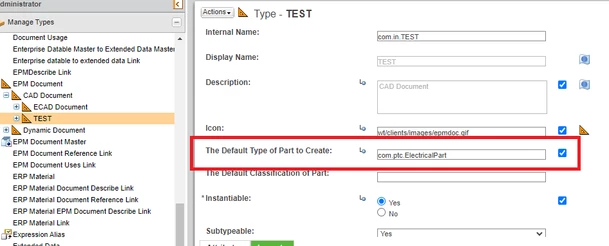
You need to define 2 CAD SubTypes where you define different WTpart type in type and attribute management.

Then you can set model parameter to define what CAD Document subtype should be used for that model and then the auto-generation uses WTPart subtypetype defined in the type and attribute management 


CS41665 - How to create subtypes CAD Document

HelesicPetr_0-1698133888663.png


So your start models just need to contain that parameter with correct value.


PetrH 

7 replies

HelesicPetr
22-Sapphire II
Oct 24, 2023 7:52 AM UTC

Hi @Dobi 


You need to define 2 CAD SubTypes where you define different WTpart type in type and attribute management.

Then you can set model parameter to define what CAD Document subtype should be used for that model and then the auto-generation uses WTPart subtypetype defined in the type and attribute management 


CS41665 - How to create subtypes CAD Document

HelesicPetr_0-1698133888663.png


So your start models just need to contain that parameter with correct value.


PetrH 

Translate
Dobi17-PeridotAuthor
17-Peridot
Oct 24, 2023 1:40 PM UTC

Hi @HelesicPetr and thanks for that! 


So there isn't a way to do this association without having a CAD subtype, I take it? 

I'll give this a try. 

Translate
HelesicPetr
22-Sapphire II
Oct 25, 2023 6:07 AM UTC

Hi @Dobi 

Yes there is a way with customization. I showed you how to achieve your needs by OOTB functions.


With customization you can do whatever you want. You just need to know what is condition so set correct subtype.


For example @RandyJones has mentioned one option with custom class that is configured in preference management for autoassociation. 


PetrH

Translate
20-Turquoise
Oct 24, 2023 1:46 PM UTC

We do this very thing here where different contexts need different WTPart subtype associated. We are doing this as follows:

  • Created a custom string attribute "Default Part Type" for
    • Product
    • Project
    • Library
  • Using a customized AutoAssociate that finds the container and gets the value of Default Part Type to set the wtpart type.
Translate
Dobi17-PeridotAuthor
17-Peridot
Oct 24, 2023 2:03 PM UTC

Did you do this with CAD subtypes or just with the string attribute?

Translate
20-Turquoise
Oct 24, 2023 2:08 PM UTC

@Dobi wrote:

Did you do this with CAD subtypes or just with the string attribute?


With my method you do not need CAD Subtypes - we do not use them. The string attribute is defined on the containers (Product, Project, and Library) using Type and Attribute Manager.

Translate