
3-Newcomer
August 20, 2026
Question

BOM Transformer between Upstream and Downstream Design BOM

  • August 20, 2026
  • 3 replies
  • 33 views

Hello,

I have actually users who use the BOM Transformer to derive the main Design BOM to make specialized Design BOM on limited scope for side analysis or tracking.

We are CAD-Centric with SolidWorks, Windchill 12.0.2.8, MPMLink for the Manufacturing BOM.

Actually Top-Down is not possible, so derive Design BOM for other Design BOM allow us to generate visualization and save creation of CAD assembly for these BOM.

With BOM Transformer and Baseline filter, we can compare quantity, see if there is new version of the components with the equivalent link. With equivalent occurrences, we can visually highlight the downstream Part still in the upstream Part and find removed Part or new Part to add.

Very useful with big assembly, but will it still work with future developments of windchill, given that the documentation does not mention this use case for the BOM Transformer ? (EBOM to MBOM only)

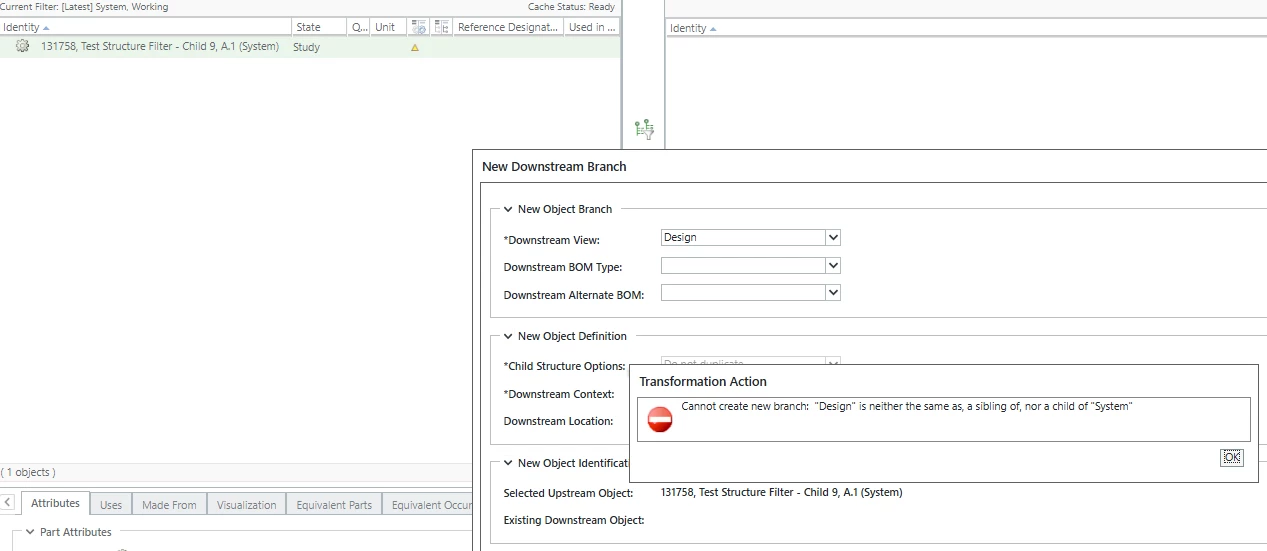
  • Is it allowed to be on the same hierarchy level of views between Upstream and Downstream ? (Design to Design)
  • It is allowed to have multiple equivalence link from different (Downstream) parts going to the same (Upstream) Part ?
    => How to see all the equivalent link going to the upstream Part ?
  • If downstream part has many level, do i need to create an equivalent link to the upstream Main Design for all these BOM to enable accurate occurrence link if we need to open independently these BOM ?

I am very interested to have your point of view and if there is any other way to do it.

Thanks !
3 replies

17-Peridot
August 21, 2026

With MPMLink you have to specify at least a different view that is considered “downstream”. Out of the box the eBOM will be (Design) and downstream will be (Manufacturing). This is something you get to define in view administration as the upstream-downstream relationship. 

When you say “top down is not possible” - what do you mean?

I don’t think you can have upstream and downstream be the same view. But that doesn’t prevent you from defining a view that is “limited scope Design” and treating that as downstream so you can take advantage of the tools you’re using now. 

Do you use alternate BOMs in MPMLink? Those are dash numbers from the base but essentially give you multiple downstream items that are all related to the same upstream BOM. 


3-Newcomer
August 21, 2026

Thanks for your response Dobi !
With same view for up and down stream side of the BOM Transformer it seems to work.
But my fear is to have another user creating an equivalence link in the other direction or on a child BOM in the product design structure, leading to a circular reference.

When you say “top down is not possible” - what do you mean?

If i create in Windchill a new BOM with a new CAD, use BOM Transformer to fill this new downstream BOM, i can’t rebuild the empty downstream CAD with the downstream Part BOM because this version of Windchill can’t do the modification in the SolidWorks CAD. Next version of Windchill seems to enable that.

So actually, if we want a specific BOM with a 3D View (Manufacturing, Mechanical Analysis,...) derived to the product design, we can do that without the need to call a designer with a CAD license and this 3D View will be synchronized to the design in the same action as update the BOM.

But there is limitations, like if we want to add Ressources in the visualization, so a solution should be CAD-Centric to generate the Design BOM, and Top-Down for the Manufacturing CAD:  Design CAD>Design Part BOM>Manufacturing Part BOM>Manufacturing CAD. But maybe I haven’t fully understood yet the concept.

I know Alternative or BOM Type, particularly for manufacturing (Manage different process or workshop, manage heavy modification, differentiate build-dismantling-component replacement usage), for case like Analysis there is no sense to reuse the design part number but i was first thinking to use a BOM Type to differentiate these specifics BOM from the product design BOM and stay in Design View because the user was the same working on the product design BOM.

So the more secure solution is to create downstream view, this will be like :
0-Design
    1-Analysis
    1-Procurement
    1-Manufacturing

Question : Are there other solution for a BOM to track early procurement (=product design BO already in Study state), in the Supplier Management or Project Management extensions ?

17-Peridot
August 22, 2026

I think you’re right with anticipating this leading to circular references:

With same view for up and down stream side of the BOM Transformer it seems to work.

We’re on Windchill 13 and the top-down design seems to kind of work… Although I haven’t tried with Solidworks. In NX, though, it does work but perhaps not in a way that I would want. 

On your note about specific 3D views of BOMs, this sounds more like Options and Variants functionality. Again, unsure about how well it would work with Solidworks in CAD because it’s unlikely to link to an equivalent of a Configurable Part in Creo (and since we’re in NX I know it doesn’t link to the equivalent there) but I think there’s a way to add locator CSYS in the model that can be used via CAD worker to correctly locate and position a particular item. 

Support documentation on this

When you say you want to add Resources, do you mean in the Windchill type attribute sense? If yes, resources are a part subtype so there shouldn’t be issues there so long as you have a model that’s been published associated to it. 

I’m not sure I understand the need for downstream views for things like Analysis and Procurement. Are you making a different view of the same BOM there? Analysis - for example - might take the CAD design as is and run simulations. 

As for tracking early procurement - this sounds more like a life cycle state than anything. You might have a life cycle state that is procurement and then it exists that at some point when the next transition is reached? 

SUMA will give you a different part to associate to your existing part that describes the vendor definition of the thing you’re internally calling something different. If you have say a bolt you’re using, SUMA will give you the option to have your bolt be called whatever you’d like internally and then have multiple associated parts that correspond to the different vendor part numbers. It does other things like tracking “recommended”, “approved” etc. I don’t think it’ll do what you want. 

ProjectLink on the other hand would give you options to tie release states to scheduling milestones reached. if you were to go with the life cycle solution for procurement, you can have the “Procurement” milestone be something you reach in your schedule. Again, i don’t think it would give you what you’re looking for. 


Do you have a sample visual of BOM differences between Analysis, Procurement, etc? I’m struggling with understanding this being a good fit for views. Maybe configurable links??