17-Peridot
December 8, 2022
Solved

CAD worker fails to start

  • December 8, 2022
  • 3 replies
  • 6424 views

Alas, in a flood of "CAD worker isn't working" posts I do think I have a new one... 


Running on one VM are 2 instances of Creo and 1 instance of NX. 

The two Creo instances are identical (copy/paste) with edit to names (i.e. "instance 1" folder and "instance 2" folder).

WorkerDaemon is set up as a service and runs automatic with a local system account.


After a restart, when I check the the worker agent, the 3 instances on this machine (and only this machine. The other 2 work fine and are setup the same) shows the workers as not started and the worker monitor is off. 

If I toggle the workerdaemon to try to get some action, nothing happens. 

I can start the worker monitor manually and then only 1 of the 2 Creo instances starts. The only way I can get the other Creo and the remaining NX workers to start is to manually launch their respective worker.bat files. 


Not sure what else to look at.

Ports that are used for the workers? 

 

Best answer by avillanueva

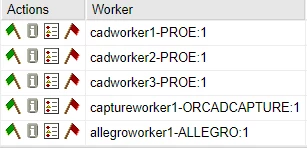
It may seem overly complicated but I have normed to setting up my workers as if they were on independent machines. 1 worker per, each with their own virtual hostname, port, FTP folder and dedicated daemon. They all essentially run on the same machine in reality but act as if they are not.  

avillanueva_0-1670619643128.png

There are so many ways that these can be configured. 


3 replies

16-Pearl
December 8, 2022

I hope you have checked this check box.


2022-11-10_9-01-44.png


Could you please give us OS details ? 

Dobi17-PeridotAuthor
17-Peridot
December 8, 2022

It's checked, yes. 


Dobi_0-1670529189686.png


OS is Windows Server 2019

16-Pearl
December 8, 2022

We too face this issue for SW 2021 and WGM 12.1 on Windows server 2019. 


I am not sure but its security related stuff in Windows server 2019. In 2016 it works just fine.


Solution : We are using "FireDaemon Pro 4 " software. You can download demo version and try. 

22-Sapphire I
December 8, 2022

It's really pretty incredible that PTC has not come up with a definitive instruction / procedure for setting up publishing of Solidworks on a server.

To my knowledge, the only supported way is to use a Windows 10 machine for publishing Solidworks.


Every admin seems to have to struggle with similar problems and it's really hard to get it stable and reliable.

15-Moonstone
December 8, 2022

Hi Mike, 

https://www.ptc.com/en/support/article/cs245930 does not answer everything but could be helpful for admins. 


15-Moonstone
December 8, 2022

Dobi,


Have you configured it as Instances or aliased workers?

When the worker monitor does not start it indicates that Server --> Worker or Worker--> Server communication is not happening and that could be due to ports or hostname entries


You may need to add the aliased name in the Server hosts 


The port should work for each aliased name 

From Worker --> Server -    telnet Server_name 5600

From Server --> Worker - telnet Worker_aliasname 601(or port which workerdaemon runs on)


Hope this helps

Vishwas 

Dobi17-PeridotAuthor
17-Peridot
December 8, 2022

@VishwasAnantwar my friend, I must admit that when I changed companies I felt a good bit of sadness in realizing I may not get to work with you directly anymore. I am very glad that not the case 🙂 


I was trying to remember and in a way retrace steps you walked me through back a few years ago on this topic. I followed the documentation and I think the bit I missed is editing the Server hosts file. 

The workers are aliased and the while I did update the worker machine hosts file I did miss the server. 

I'll be able to test this after hours to confirm.


Many thanks!

Dobi