

Control Over Display Order of Design Options and Design Choices
We are currently using Windchill 13.0.2.12.
Within the Configurable Module, both the Option Pool and Option Set display Design Options and Design Choices with their IDs prefixed to the name, for example:
[ID] Option Name[ID] Choice Name
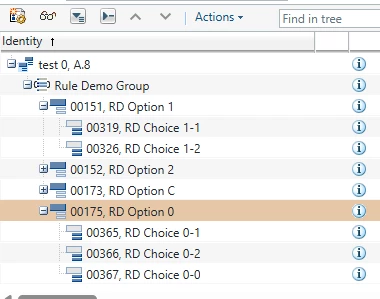
(Note that Groups do not appear to follow this convention.)
Because the IDs are displayed first, Design Options and Design Choices are effectively sorted by ID (either ascending or descending, depending on the selected sorting preference). In our case, this is not the desired behavior, as we would prefer to control the display order based on logical grouping, process flow, or another business-specific sequence.
Is there a way to:
- Suppress the display of IDs for Design Options and Design Choices so that sorting is based solely on the name?
- Define a custom display order for Groups, Design Options, and Design Choices?
- Manually reorder Groups, Design Options, and Design Choices within an Option Pool or Option Set?
Any guidance, configuration options, customization approaches, or best practices would be greatly appreciated.
Thank you.