
1-Visitor
September 16, 2014
Solved

Creo Parametric 2.0 "Save a Copy" within Windchill Does Not Work

  • September 16, 2014
  • 3 replies
  • 9112 views

Dear Community Members,

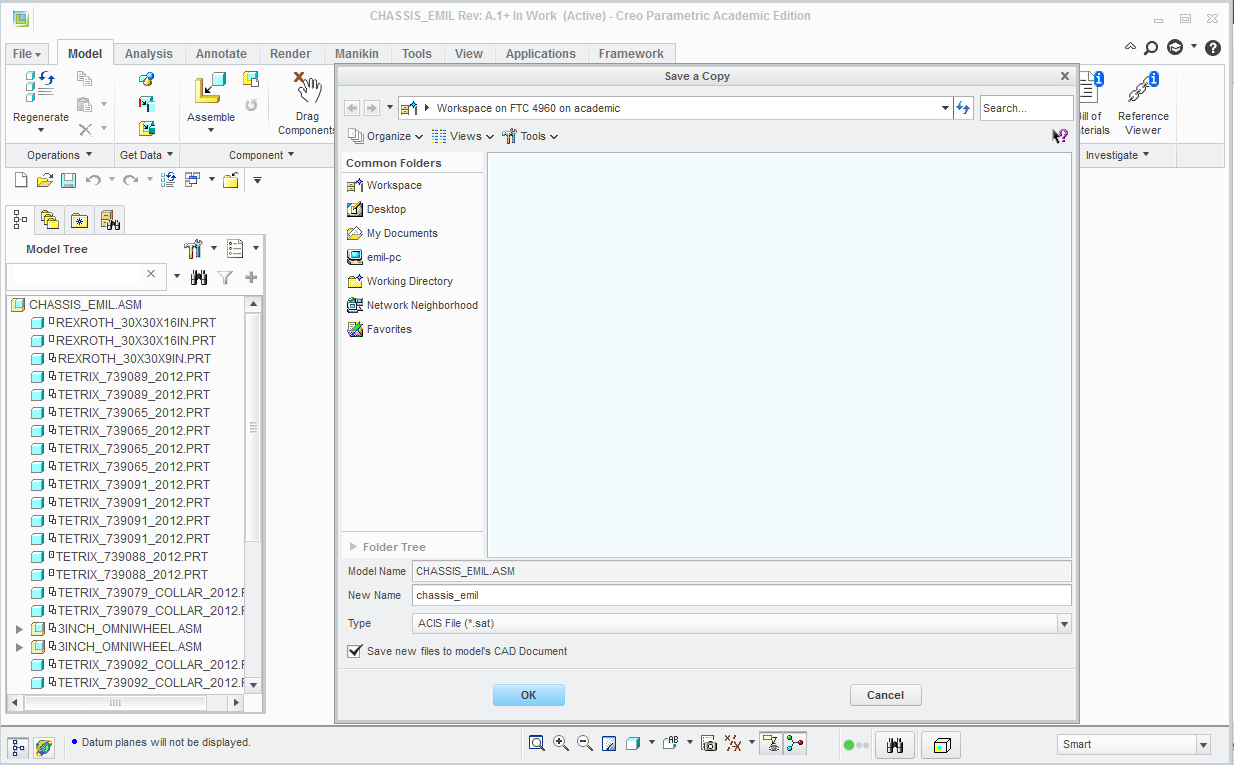
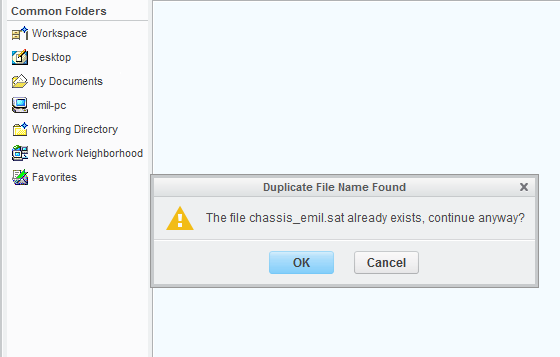
When I do a Creo Parametric 2.0 "Save a Copy" within Windchill, it states it has been successful at creating but I cannot find anywhere within Windchill folders. See screenshots of steps below...
2014-09-16_132929.png

2014-09-16_132954.png

2014-09-16_133054.png

Yet that file does not appear in any folder within Windchill.

Any suggestions?

Best answer by TomU

Look again at your first picture. You saved the new file as an attachment to the existing CAD document. If you want the new file to be managed separately, you have to uncheck the box, "save to files to model's cad document" when saving.

Keep in mind that saving anythingto a workspace connected to Creo will automatically treat that file as a CAD model, even if it's not (PDF, IGES, STEP, DXF, STL, etc.). If you want to treat it as a (non-Creo) document that can be managed outside of Creo, then you should save it outside of the workspace (desktop, etc.) and then manually add it to a new (Windchill) document.

3 replies

1-Visitor
September 16, 2014

You asked it to save it as a .SAT file type. Is that the file type you are searching for?

It will only appear within your workspace; not in Commonspace unless it is uploaded.

erivas1-VisitorAuthor
1-Visitor
September 16, 2014

Hi David,

Thanks for your quick response. How can I upload to Windchill from withing Creo Parametric? I cannot even find the file in my workspace.

-Emil

1-Visitor
September 16, 2014

I'm not sure. It isn't a file type that would ordinarily be managed that way, but a data file separately attached to a document record type. You can see the checkmark beside "save new files to model's CAD Document."

Have you opened the Windchill browser to examine the workspace?

By the way, what is the intended use for this file?

erivas1-VisitorAuthor
1-Visitor
September 16, 2014

Here is view from Windchill...

2014-09-16_163019.png

to share internally with the FTC Team in a formats more friendly to tools that output to .FBX format for animation purposes. As I am trying to use Windchill as the onestop team file center, and because I am using Creo Parametric, I was hoping it would be fairly seamless; however I seem to be runnng into difficulty. Trying to see the viability of solely using Windchill rather than our typical Google Drive.

TomU23-Emerald IVAnswer
23-Emerald IV
September 16, 2014

Look again at your first picture. You saved the new file as an attachment to the existing CAD document. If you want the new file to be managed separately, you have to uncheck the box, "save to files to model's cad document" when saving.

Keep in mind that saving anythingto a workspace connected to Creo will automatically treat that file as a CAD model, even if it's not (PDF, IGES, STEP, DXF, STL, etc.). If you want to treat it as a (non-Creo) document that can be managed outside of Creo, then you should save it outside of the workspace (desktop, etc.) and then manually add it to a new (Windchill) document.

23-Emerald IV
September 16, 2014

Sorry David, I just realized you said the same thing about attachment.

erivas1-VisitorAuthor
1-Visitor
September 16, 2014

Shows in workspace in Creo Parametric...

2014-09-16_170453.png

but not in workspace from Windchill's perspective???

2014-09-16_170653.png
