1-Visitor
August 12, 2024
Solved

Demote own Promotion Request

  • August 12, 2024
  • 2 replies
  • 1704 views

Hello,


Besides assigning yourself as one of the Reviewers and waiting until everyone else has signed off on a PR, is there a way to "self-demote" a PR? For example, you push it through and then realize you made a mistake on a drawing. In our current workflow, we have to ask one of the reviewers to mark their task as rework. Is there a way to do this yourself?


Thanks!
Best answer by cying

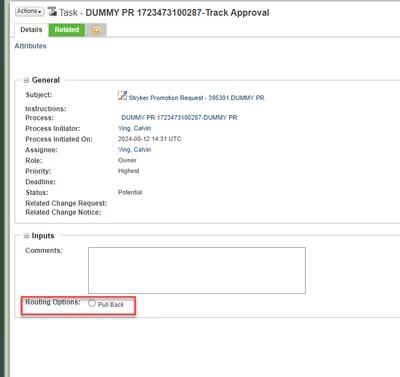
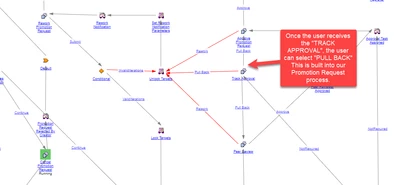
I'm no WC admin, but in our process the user can do a pull-back once they receive the track promotion request task.


cying_0-1723473953796.png

cying_1-1723473963845.png


2 replies

23-Emerald III
August 12, 2024

It depends on how your system is set up. On our Windchill systems, I have the ability for the creator of a PR to delete it if they find a mistake and none of the assigned reviewers have done anything to the PR yet. This makes it easier for getting proper information into the reviewed PR before approval. We still get some that are rejected but the creator's ability to delete one reduces the number that get rejected.

12-Amethyst
August 12, 2024

Depending on how your system is set up.  We can do a "pull-back" and the system will set the state back to their original state so you can make the changes and do a "submit".  We can also delete/cancel the PR and recreate it.


The benefit of the "pull-back" is you don't have to redo the PR, simply do a "submit" when done.


Calvin

1-Visitor
August 12, 2024

Hey Calvin - a pull back sounds like what we are looking for! Is that something we can allow a user to do or does it require special permissions the way your system is set up?

avillanueva
23-Emerald I
23-Emerald I
August 12, 2024

You should be able to do this. Basically, while in review, the author holds on a to a "break glass" task in their task list. Its similar to the Part Request workflow I would imaging. No special access since the workflow can be setup to change states, cancel review tasks and route back to the beginning or cancel if need be.