1-Visitor
August 19, 2013
Solved

ghost files

  • August 19, 2013
  • 1 reply
  • 1839 views

How ghost files are ceated..?

Best answer by AzizKaragoz

You have a reference to a file wich no longer exists.

How to create it for fun..:

-In session createn a assembly and two parts as in example(asm0001.prt, prt0001.prt, tmp.prt). Do not save anything yet.

-First insert tmp.prt into the assembly then replace it with prt0001.prt.
-While replacing you should have checked "Remember These Components"
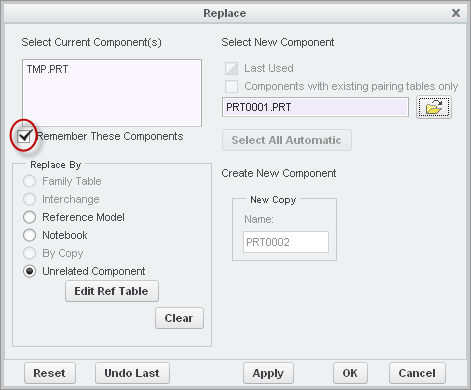
19-08-2013+14-52-02.png

- Now in Refrence Viewer you'll see a trash can next to the tmp.prt. If you click on it you will break the link, but do not do it since we want the gost. Close the RefViewer

19-08-2013+15-06-10.png

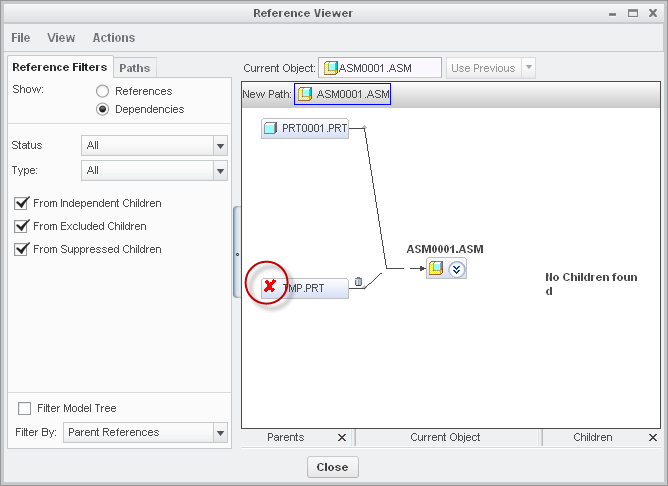
- Now erase tmp.prt from session. Now in RefViewer you will see a X symbol in front of tmp.prt which means that the part is not open in the session. Still do not remove it coz we want to bust a ghost

19-08-2013+15-10-37.png

- Now save the assembly. Now you will see that a gost part will is created.

19-08-2013+15-13-52.png

---

If you don't want the ghost, then you need to do the opposite. Never remember unused components, or delete the links in RefrenceViewer if you already have.

1 reply

1-Visitor
August 19, 2013

You have a reference to a file wich no longer exists.

How to create it for fun..:

-In session createn a assembly and two parts as in example(asm0001.prt, prt0001.prt, tmp.prt). Do not save anything yet.

-First insert tmp.prt into the assembly then replace it with prt0001.prt.
-While replacing you should have checked "Remember These Components"

19-08-2013+14-52-02.png

- Now in Refrence Viewer you'll see a trash can next to the tmp.prt. If you click on it you will break the link, but do not do it since we want the gost. Close the RefViewer
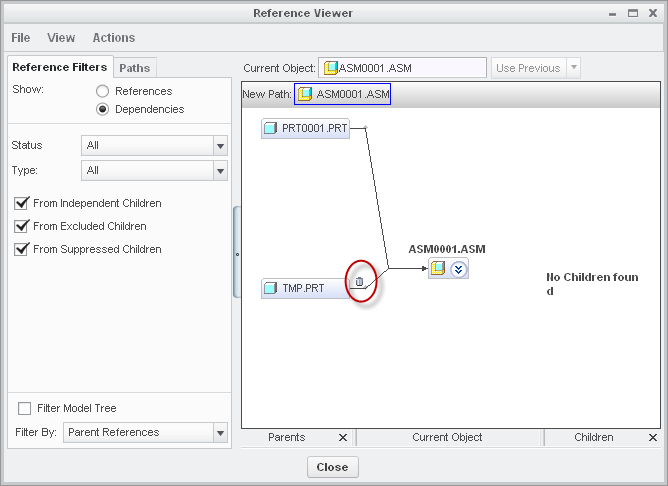
19-08-2013+15-06-10.png

- Now erase tmp.prt from session. Now in RefViewer you will see a X symbol in front of tmp.prt which means that the part is not open in the session. Still do not remove it coz we want to bust a ghost

19-08-2013+15-10-37.png

- Now save the assembly. Now you will see that a gost part will is created.

19-08-2013+15-13-52.png

---

If you don't want the ghost, then you need to do the opposite. Never remember unused components, or delete the links in RefrenceViewer if you already have.

1-Visitor
August 21, 2013

Thank you aziz..