5-Regular Member
June 17, 2024
Solved

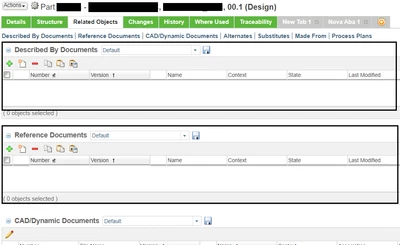
How can I correctly show these two fields? (They have suddenly stopped working)

  • June 17, 2024
  • 4 replies
  • 2493 views

RS_11013548_0-1718649056863.png


Best answer by joe_morton

Just to be clear, the image you shared was of a WTPart and you highlighted the "Described By Documents" and "Reference Documents" tables. These tables would show related Documents.

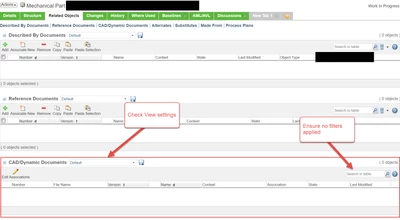
Scrolling further down (cut off in the image you shared) is the "CAD/Dynamic Documents" table which would show related CAD Documents.

In Windchill, Documents and CAD Documents are two different things!


You showed another image where you were trying to search for the CAD Document, but that search window looks like it is for Reference Documents. That won't return CAD Documents, only Documents.


Links in Windchill are bidirectional, so if you see the link you're looking for on one object, it is for sure on the other object. You may just be looking in the wrong table. If you are looking in the right table, make sure that the table isn't filtered and that the View you're using in that table isn't omitting the items you're expecting to see.
 

joe_morton_0-1718992881036.png


4 replies

23-Emerald III
June 17, 2024

What version and release of Windchill?

All parts or just this one part?

Did the object have the relationships listed before?

5-Regular Member
June 18, 2024

Release 13.0.0.1


All parts have this issue!


I'm not sure if the relationships where listed before...


What if it is a permission problem? Then how can I solve it?

16-Pearl
June 17, 2024

Hello,


Just refresh the page if you have documents linked already.


If WTDocuments(Documents) objects are not linked to the WTPart , please link it by clicking + button. 

5-Regular Member
June 18, 2024

Refreshing the page didn't work... 😕


RS_11013548_0-1718716012627.png


And I cannot find my CAD document by its number to link with (the number is correct)


17-Peridot
June 18, 2024

Might need to clear the browser cache.

5-Regular Member
June 18, 2024

Cleared it, but didn't work either

21-Topaz I
June 18, 2024

Two questions.  One might be a little simplistic so forgive me.  But we need to be sure.

1. Are you sure there are files attached?

2. What browser are you using? IE is no longer supported.  Only Chrome and Edge are supported.

5-Regular Member
June 18, 2024

We can see the related parts from the CAD document, but the other way around doesn't work!


( So { DOCUMENT => PART } link exists! )


How can I be sure that there is a connection from the part to the document? ( Check if { DOCUMENT <= PART } link exists )


I am using MS Edge!


17-Peridot
June 19, 2024

I think you are talking of the DescribedBy link

https://community.ptc.com/t5/Windchill/Describes-and-DescribedBy-relationship/td-p/914009

Have you explored this in QueryBuilder?


But no: you say they suddenly stopped working.  You need to troubleshoot what things changed just before the links stopped working.