10-Marble
November 5, 2014
Solved

How do I tell what context a Product was created in?

  • November 5, 2014
  • 1 reply
  • 1164 views

New Windchill Administrator here...

A colleague of mine created several Products but I can't tell what context they were created in. Are they at the site level or in a particular organization. I thought clicking on the info button might show it but no luck.

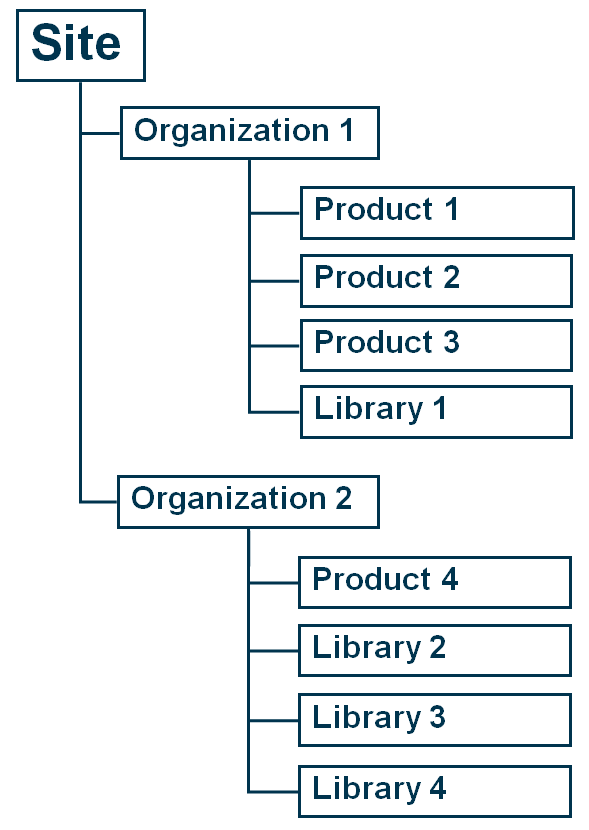
Is there any visual representation of the relationships between contexts that I can use? Like this one that is on the Learning Connector?context.png
Best answer by LoriSood

Rosemary,

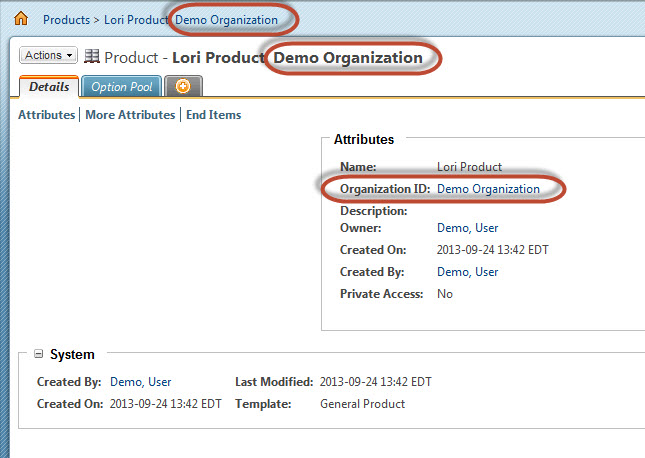
All products are going to belong to an organization. By default Organization info is hidden in the UI. You can expose it by setting the following preference in Site > Utilities > Preference Management:

Display > Expose Organization = Yes

If that is set then you will see the organization info displayed in the Product Details

11-5-2014+5-15-22+PM.jpg

1 reply

LoriSood23-Emerald IAnswer
23-Emerald I
November 5, 2014

Rosemary,

All products are going to belong to an organization. By default Organization info is hidden in the UI. You can expose it by setting the following preference in Site > Utilities > Preference Management:

Display > Expose Organization = Yes

If that is set then you will see the organization info displayed in the Product Details

11-5-2014+5-15-22+PM.jpg

CADQueen10-MarbleAuthor
10-Marble
November 6, 2014

Thank you! I've been a Creo user for the last 16 years so getting used to the Windchill UI is quite a shift!