
1-Visitor
September 16, 2014
Solved

How to attach iges as a secondary content with primary content object ?

  • September 16, 2014
  • 1 reply
  • 821 views

Hi

How to attach iges as a secondary content with primary content object ?

Ex:

Folder context

a. Test.prt

b. 123.iges

Want to atatch 123.iges as a secondary atatchment with Test.prt .
Best answer by LoriSood

Haris,

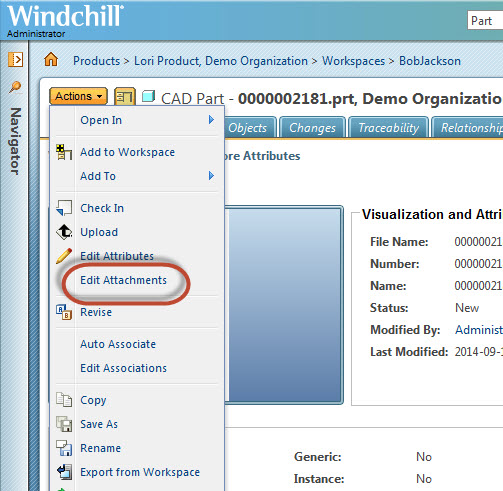
You can attach data as secondary content by using the Actions > Edit Attachments action on the details page of the CAD Document:

9-18-2014+5-50-47+PM.jpg

1 reply

LoriSood23-Emerald IAnswer
23-Emerald I
September 18, 2014

Haris,

You can attach data as secondary content by using the Actions > Edit Attachments action on the details page of the CAD Document:

9-18-2014+5-50-47+PM.jpg