18-Opal
November 28, 2017
Solved

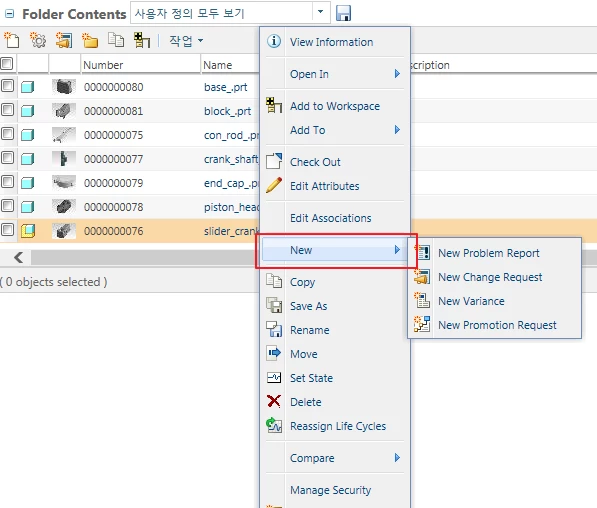
how to hide New field except of release

  • November 28, 2017
  • 1 reply
  • 1731 views

how to hide New field except of release?

hidenewRequest.png

I would like to be visible only in the release state for the new change request in the area marked with a red square there.

Promotion requests do not occur if you do not have edit rights.
Do you have permission to create change requests as well?
What if it is?
thank

Best answer by TomU

I don't know if it is possible to limit creation of change objects for only those affected items that are in a certain state.  It seems like this would be tricky since the change object is a completely different object with its own lifecycles, permissions, etc.


You can hide visibility to these controls with profiles.  For example, the profile applied to this user only allows promotion requests:
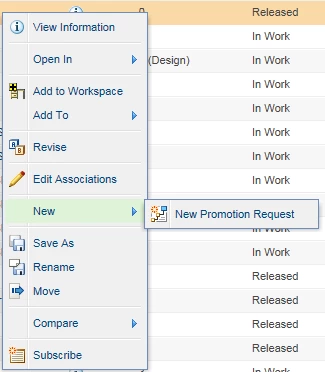
Promotion Request.png


To get started, create a new profile, uncheck everything, and apply it to a test user.  See what is missing then slowly add back in functionality you want that user to have.  Once happy, apply the profile to other users, groups, or contexts.


I would suggest creating the profiles at the org level initially.  They can easily be exported and imported to other locations.


Keep in mind that profiles only hide things, they are not access controls.  They also don't hide everything, and some things they are are supposed to hide actually don't get hidden.  Still, they are better than nothing.

1 reply

TomU23-Emerald IVAnswer
23-Emerald IV
November 28, 2017

I don't know if it is possible to limit creation of change objects for only those affected items that are in a certain state.  It seems like this would be tricky since the change object is a completely different object with its own lifecycles, permissions, etc.


You can hide visibility to these controls with profiles.  For example, the profile applied to this user only allows promotion requests:

Promotion Request.png


To get started, create a new profile, uncheck everything, and apply it to a test user.  See what is missing then slowly add back in functionality you want that user to have.  Once happy, apply the profile to other users, groups, or contexts.


I would suggest creating the profiles at the org level initially.  They can easily be exported and imported to other locations.


Keep in mind that profiles only hide things, they are not access controls.  They also don't hide everything, and some things they are are supposed to hide actually don't get hidden.  Still, they are better than nothing.

CHASEONHO18-OpalAuthor
18-Opal
November 28, 2017

Thank you very much!
I want to ask about other problems separately!
Each time a Java application is run, a security alert window is displayed.
I have added Windchill's DNS to the exception site list.
How do I run without a security alert?