1-Visitor
December 6, 2013
Solved

How to sort parts in structure

  • December 6, 2013
  • 2 replies
  • 1455 views

Hi.

Is there any way to set sorting (comparison) rule for parts in part structure pane?

I have some menu right above part structure pane, but there is only one column "Identity" for sorting with no possibility to add other columns.

Can i define my own patr's comparator to be used in part structure?

Thanks.
Best answer by KD_01

Hi Vasiliy,

Not sure whether you can define your own part's comnparator to sort in part structure but you can add other column like name or number there apart from the "identity" column.

All the below screenshots are from 10.1 M040

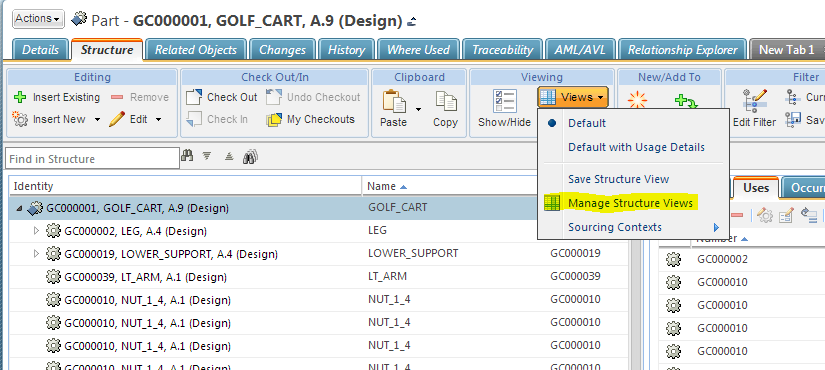
Go to Views --> Manage Structure Views

struct.PNG

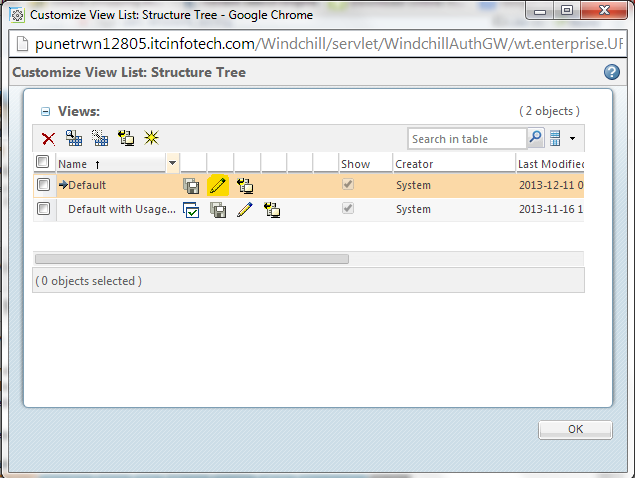
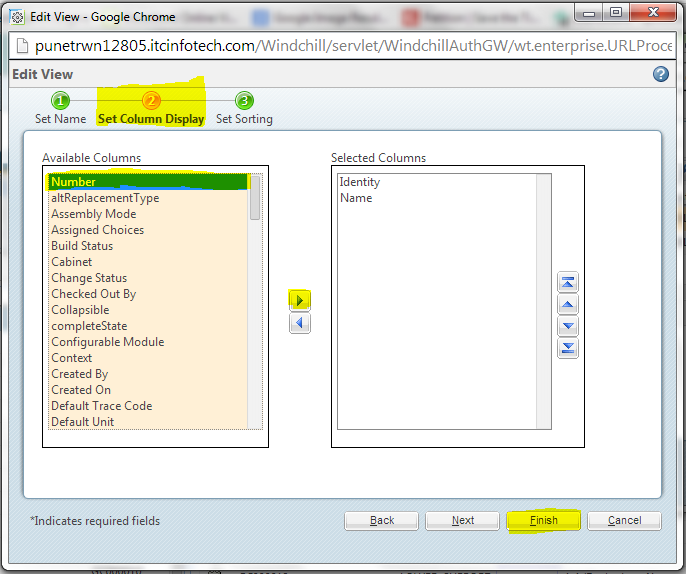
click on edit --> Set Column Display. Move the necessary columns from Left and side to Right hand side and click on Finish.

struct1.PNG

struct3.PNG

Regards,

Kaushik

2 replies

1-Visitor
December 6, 2013

You don't see the other attributes than the identity(Number attribute) on the structure pane, I guess that's the reason why Windchill doesn't shows the filtering options there.

KD_0112-AmethystAnswer
12-Amethyst
December 10, 2013

Hi Vasiliy,

Not sure whether you can define your own part's comnparator to sort in part structure but you can add other column like name or number there apart from the "identity" column.

All the below screenshots are from 10.1 M040

Go to Views --> Manage Structure Views

struct.PNG

click on edit --> Set Column Display. Move the necessary columns from Left and side to Right hand side and click on Finish.

struct1.PNG

struct3.PNG

Regards,

Kaushik