

17-Peridot
September 26, 2025
Solved

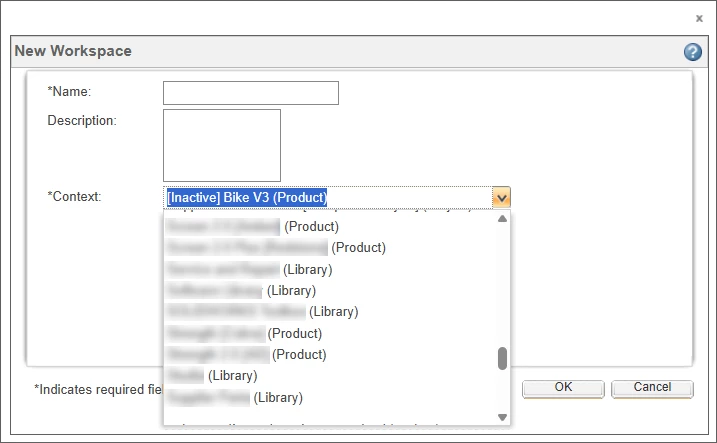
Inability to identify the context type when creating a workspace from the Windchill home page

  • September 26, 2025
  • 3 replies
  • 798 views

As mentioned in this topic.
I have the same issue with the inability to identify the context type when creating a workspace from the Windchill home page. however, one of my TEST servers is currently exhibiting the desired behavior and i do not know what is different about this server. i have seen the same output in 1-2 screen shots for CS Articles in the PTC KB, but PTC TS cannot determine what is causing the context type to be shown after the name in ( ). anyone else experience this?


we are running wc12.0.2
 

ScottMorris_0-1758899179703.png


Best answer by ScottMorris

Solution found by PTC Technical Support: Duplicate Container Names!

If you have a Library, Product or Project context with the same name, Windchill will display the context type in the New Workspace UI when invoked from the Windchill Home Page. I spent a lot of time comparing exported user preferences and log files trying to find what enabled this "feature".


The magic is that you must also be a member of both context teams for the context type to appear. That is why it was only working for me and not the others users I checked with. 


I am going to validate this by creating a Project with the same name as a Product or Library that has the Organization added to the team which should enable this display for all users 🤞

Initial test with the Guest Role was unsuccessful. Looks like users, groups, or roles need to be added to a team role in the context. 


PTC Technical Support has updated CS Article CS432444 which previously defined this capability as unavailable

https://www.ptc.com/en/support/article/CS432444

3 replies

avillanueva
23-Emerald I
23-Emerald I
September 29, 2025

@ScottMorris, can you reference the knowledge base article. The only one I can see is the one saying its not possible: CS246957. What you are showing is indeed different that what I see where context type is not shown. The reference article seemed to allude to users not being able to see certain contexts based on their role. That does not appear to be the same as your issue.

17-Peridot
September 29, 2025

Great point, totally forgot to reference the CS Article I was looking at: CS432444


The change in display is only happening for my user accounts and not anyone else's. I am going to export user preferences today to compare and hopefully identify which preference I might have changed to enable the display of the context type.

joe_morton
18-Opal
18-Opal
September 29, 2025

This would definitely be a welcome behavior.

We have a naming convention where we include the context type in every context name. It would be nice to not have to do that!

avillanueva
23-Emerald I
23-Emerald I
September 29, 2025

avillanueva_0-1759163615935.png


ScottMorris17-PeridotAuthorAnswer
17-Peridot
October 8, 2025

Solution found by PTC Technical Support: Duplicate Container Names!

If you have a Library, Product or Project context with the same name, Windchill will display the context type in the New Workspace UI when invoked from the Windchill Home Page. I spent a lot of time comparing exported user preferences and log files trying to find what enabled this "feature".


The magic is that you must also be a member of both context teams for the context type to appear. That is why it was only working for me and not the others users I checked with. 


I am going to validate this by creating a Project with the same name as a Product or Library that has the Organization added to the team which should enable this display for all users 🤞

Initial test with the Guest Role was unsuccessful. Looks like users, groups, or roles need to be added to a team role in the context. 


PTC Technical Support has updated CS Article CS432444 which previously defined this capability as unavailable

https://www.ptc.com/en/support/article/CS432444

avillanueva
23-Emerald I
23-Emerald I
October 8, 2025

Amazing file. An edge case on an edge case on an edge case. 

"This place is a X-file wrapped in a cover up and deep-fried in a paranoid conspiracy"

avillanueva_0-1759932457413.png