
10-Marble
January 11, 2017
Question

Is there a way to show the first iteration information for Created By and Created On attributes?

  • January 11, 2017
  • 7 replies
  • 2787 views

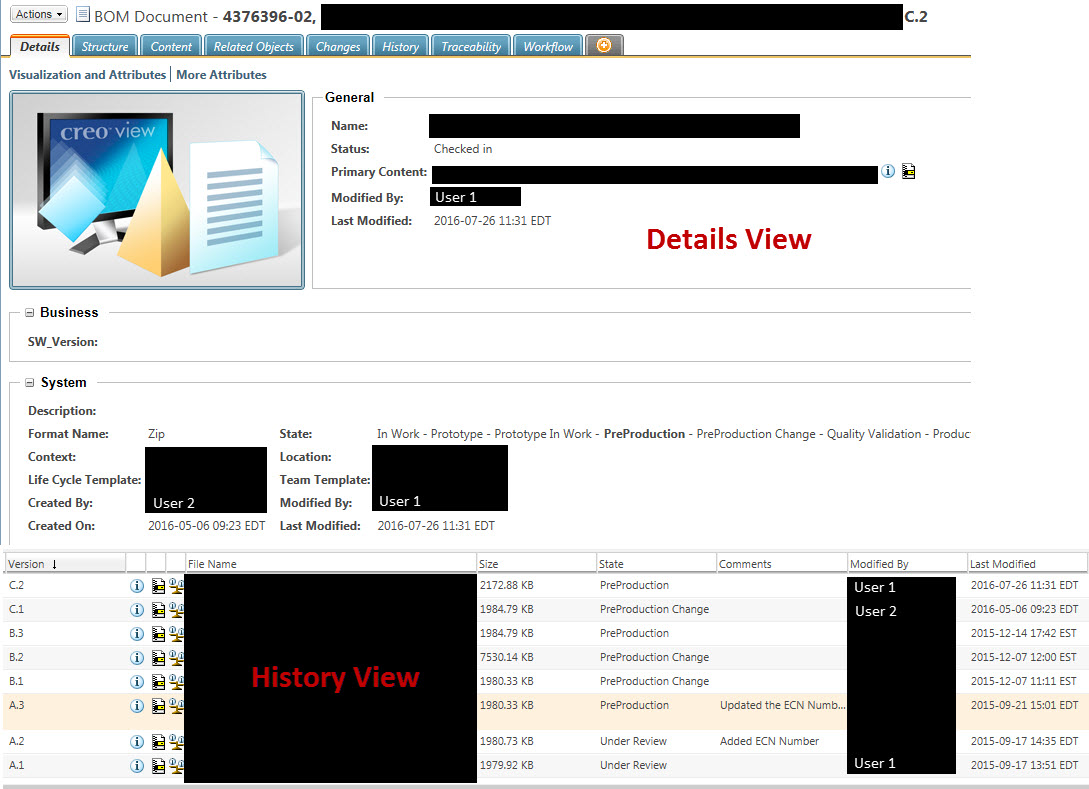
Look at the following example of a document created in Windchill PDMLink:
Details and History Views.jpg

Looking at the history view at the bottom of the above image, a document was created by "User 1" on 2015-09-17 13:51 EDT at version A.1.  It went through a series of changes.  On 2016-05-06 09:23 EDT, a change administrator (User 2) revised the object as part of an ECN to make version C.1.  Then the document was checked out and changed, and checked back in once again on 2016-07-26 11:31 EDT by User 1 and then the document was released again.

If you look at the details view for the current version (C.2), it lists the "Created By" user as User 2, on the date when C.1 was created.  This is not intuitive to the users, and we prefer to see the date of the A.1 version and the individual who created that version. 

Is there a way to get "Created By" and "Created On" to reflect that?

7 replies

23-Emerald III
January 11, 2017

That information is only carried in Windchill on a per revision level. You have found it on the History page, but the item description page will only show it for the latest revision.

If you want to use that information on a drawing, so it doesn't change, that can be done using relations to 'lock' the revision A created information.

mdrum10-MarbleAuthor
10-Marble
January 11, 2017

Thank you Ben.  Unfortunately, what I ultimately need to do is be able to perform a search, or run a report to try to find out who the creator was of an object, and when it was created.  When I go into a folder view of a Product or Library, and include the "Created By" and "Created On" columns in my table display, it gives me the same information as the details page.  If I do a search, I get the same results.  I can't afford to open up every drawing, or every document to get to this information.

23-Emerald III
January 11, 2017

You may be able to get the information you want from Query Report against the DB directly since all the information is in there.