
1-Visitor
August 5, 2014
Solved

Is there any option to move the object from common space to work space without selecting check out option ?

  • August 5, 2014
  • 3 replies
  • 1986 views

Hi

Is there any option to move the object from common space to work space without selecting check out option ?

I studied that when revising the object it should not be check out , also the revising can be done in workspace .
Best answer by TomU

Revising can be initiated from a workspace or from commonspace, but fundamentally it is a server action. The revise happens to the server object, not the workspace object (if different).

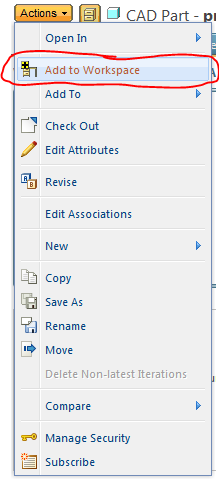
To add something to the workspace without checking it out, use the "Add to Workspace" functionality:

9.PNG

3 replies

TomU23-Emerald IVAnswer
23-Emerald IV
August 5, 2014

Revising can be initiated from a workspace or from commonspace, but fundamentally it is a server action. The revise happens to the server object, not the workspace object (if different).

To add something to the workspace without checking it out, use the "Add to Workspace" functionality:

9.PNG

1-Visitor
August 5, 2014

I am new to windchill

Thanks for your valuable answer .

What is duplicate objects in windchill & how to create ?

12-Amethyst
August 6, 2014

With respect to CAD Document Objects. They are never really “moved” from common space, and no files in common space are “edited”. Just new changed versions added.

  • Add to workspace creates a working copy in your workspace (same version number).
  • Workgroup Manager Download puts an additional local copy of the content files on your computer.
  • Upload puts changes you made to files in your local cache onto the server.
  • Checkout really is just a status change. Only one person can have a revision of a CAD Doc checked out. Checking it out prevents others from doing the same. Having an object checked out, gives you sole permission to check-in. i.e. sole permission to create a new version of the CAD Doc in common space, which may also contain a new version of the content file.

Think of revise as a “save-as” action for the CAD Doc business object. The content file has not changed, it actually shares a link to the same file as the version that it was revised from. The important thing is that the lifecycle state of the new revision is likely different, meaning different permissions apply. e.g. the new revision can be checked out and edited, but not the old.