Hi Mark,
There are two things to be done here:
First, to get the Pro/INTRALINK client to run under Windows 7, you need to change how the embedded java executable runs. The version that comes with Pro/I 3.4 is old and not supported under Windows 7. So if you run it in compatability mode it will work.
- Go to the <proiclient>\i486_nt\jre\bin\ folder and select javaw.exe
- RMB and select Properties and select Compatability
- set it to Windows Vista (Service Pack 2) as shown
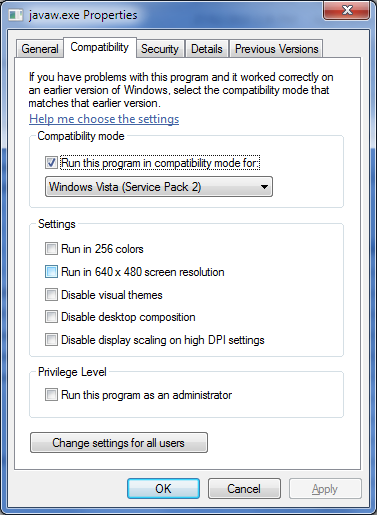
Now Pro/INTRALINK 3.4 M062 will run. 
The second step is not required, but more of a "nice to have". If you're running a Windows Theme with Aero effects, when you run Pro/I it will turn them off. To fix this do the following:
- Go into your <proiclient>\bin directory and select your Pro/I startup command (e.g. proiclient3.4.bat) and edit it.
- Change the line:
start /B %prodir%\%mc%\jre\bin\javaw -Xmx256m -Xss8m -jar %PRO_DIRECTORY%\java\lib\Intralink.jar -l %luknfeel% %intralinkparams% >> "%logfile%"
to
start /B %prodir%\%mc%\jre\bin\javaw -Xmx256m -Xss8m -Dsun.java2d.noddraw=true -jar %PRO_DIRECTORY%\java\lib\Intralink.jar -l %luknfeel% %intralinkparams% >> "%logfile%"
Note that Pro/I 3.x is not supported on Windows 7 at all by PTC. But this should get you going.
Regards,
Allan

