12-Amethyst
July 15, 2014
Solved

Reporting object types with different type name formats

  • July 15, 2014
  • 2 replies
  • 2251 views

I’m trying generate a .qml report of object types that displays the type name in 2 formats

1) Fully qualified type name - wt.part.WTpart|com.acme.softype

2) RootType:branchID(latest) - wt.part.WTpart:77137

Does anybody know if this is possible?
Best answer by DarrenStorey

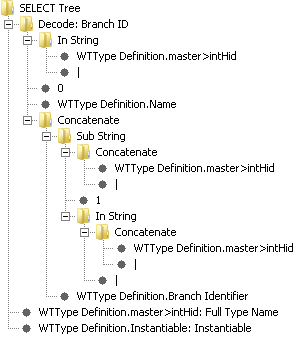
With a bit of help from my colleague 😉 now have a solution to this. See attached.

This report is handy when used in conjunction with other reports such as ACL / Object Initialization rules.

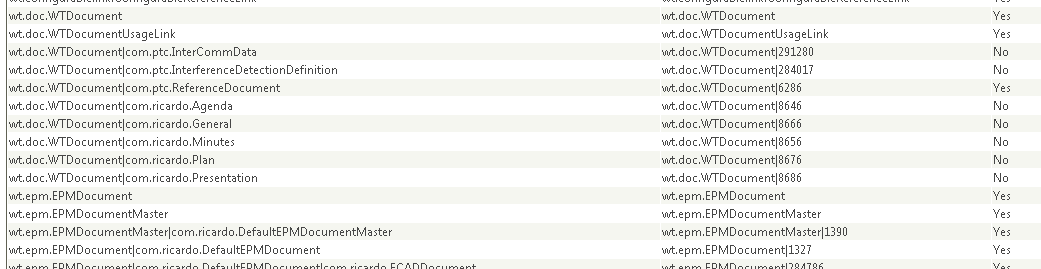
The ACL report displays the soft type which the access rule applies to in the format wt.doc.WTDocument|8666. The OIR report displays the type which the initialization rule applies to in the same way.

Personally I don't recognize subtypes by their branch ID, I need the full type name. The report lists each type in both name formats.

15-16-26.png

15-19-04.png

2 replies

22-Sapphire I
July 15, 2014

Attached is likely close to what you're looking for.

12-Amethyst
July 15, 2014

Cheers Mike,

I've been playing with the WTTypeDefinition. For sure it has the soft type name and the branch ID.

Also you can recursively drill "up" parent by parent until after an unknown number of jumps later you arrive at the root type (if not already there). In your report you are showing just the immediate parent.

WTType Definition.Parent.Name

and we could keep going so

WTType Definition.Parent.Parent.Name

WTType Definition.Parent.Parent.Parent.Name.....

Some Types are 4-5 deep.

Given multiple columns of parent names, I could do some trickery in Excel to determine which is the root type then append the branch ID of the softtype. It would be much more convenient if for a given subtype I could report the name directly as (rootype:branchID of subtype).... and thus avoid the need to post process the report.


DarrenStorey12-AmethystAuthorAnswer
12-Amethyst
July 17, 2014

With a bit of help from my colleague 😉 now have a solution to this. See attached.

This report is handy when used in conjunction with other reports such as ACL / Object Initialization rules.

The ACL report displays the soft type which the access rule applies to in the format wt.doc.WTDocument|8666. The OIR report displays the type which the initialization rule applies to in the same way.

Personally I don't recognize subtypes by their branch ID, I need the full type name. The report lists each type in both name formats.

15-16-26.png

15-19-04.png