
1-Visitor
September 10, 2014
Solved

Saving a copy to edit

  • September 10, 2014
  • 3 replies
  • 4182 views

How would I go about taking a model, drawing, and pdf that are in Windchill and save a copy of each in a folder on a separate server than windchill? They all have to be checked out so they cannot be edited in the mean time. The reason for this is the procedure we have is to save a copy of what is being changed in a certain folder. That copied file gets edited and reviewed. Once it is accepted, then the copy (and updated) files will replace the ones that were checked out originally.

Whenever I go to save a copy in Creo, is only allows me to save in my workspace.
Best answer by TomU

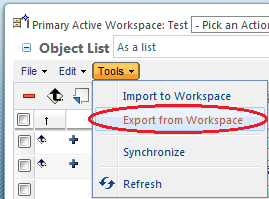
This won't work for the PDF, but for CAD documents you can simply add them to a workspace and then do a "Tools", "Export from Workspace" (using the embedded browser in Creo).

110.png

There is a corresponding "Import to Workspace" that can be used to bring the data back in later as well.

3 replies

1-Visitor
September 11, 2014

Hello Chris:

I hope this helps you some.

Once your drawing is in your workspace, you can BACKUP a copy to the server location that you want.

When you are done modifying, you can then IMPORT it back to the workspace and select the modified version to replace what resides in the workspace and finally check it back in to Windchill.

Good luck.

~Benito

23-Emerald I
September 19, 2014

Chris,

Does Benito's suggestion work for you?

MSC121-VisitorAuthor
1-Visitor
September 22, 2014

I don't seem to see an option to backup. I see a save as but that just saves it in Windchill. Is there a way to get CAD documents out of windchill once theyve been checked in? And when I say get them out of Windchill, what I mean be able to save them in a folder on my desktop or somewhere else (not on the same server as Windchill).

TomU23-Emerald IVAnswer
23-Emerald IV
September 22, 2014

This won't work for the PDF, but for CAD documents you can simply add them to a workspace and then do a "Tools", "Export from Workspace" (using the embedded browser in Creo).

110.png

There is a corresponding "Import to Workspace" that can be used to bring the data back in later as well.

MSC121-VisitorAuthor
1-Visitor
September 22, 2014

Thats perfect. Can you use that import to workspace button to import multiple files at once?