16-Pearl
October 13, 2015
Solved

Task Completion

  • October 13, 2015
  • 2 replies
  • 4370 views

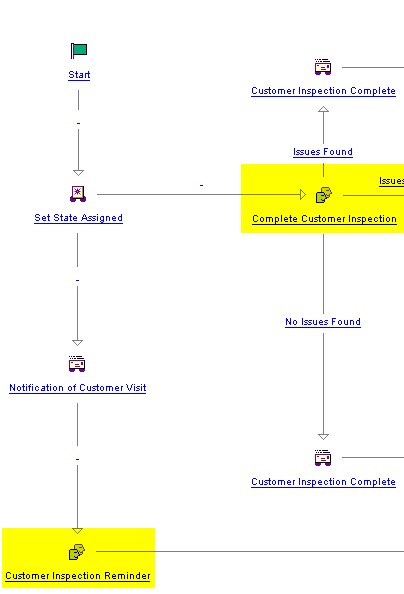
Is there an easy way to stop a user from completing task until an earlier parallel task is completed?  See attached picture, I want to block the Complete Customer Inspection from being completed until the Customer Inspection Reminder is completed.

CI.jpg

Best answer by DonSenchuk

I think Bob Sindelar's loop link solution is the most appropriate.

However, that doesn't cover denying the CIR assignee the ability to modify after s/he has completed that work. This, I think, would require another life cycle state change -- I'll call it Post-CIR -- to be inserted after the CIR task is completed but before the AND node the brings both paths back together.

In your policy administration, the CIR assignee has +View but -Modify, -Modify Content for that workflow object while at the state Post-CIR. Meanwhile, the CCI assignee has +View, +Modify and +Modify Content for both life cycle states; Assigned and Post-CIR. After CCI completes their task the next life cycle state would deny any modify action from both assignees.

(edit to add: minor clarification)

2 replies

12-Amethyst
October 13, 2015

Put them in sequence.

GregOlson16-PearlAuthor
16-Pearl
October 13, 2015

Yes Don...the simplest answer is most of the time the best way to go, but I want the Complete Customer Inspection task to be visible on the users home page from the minute the PBO is created.

12-Amethyst
October 13, 2015

I wondered if it was something like that but didn't want to make assumptions not supported in your post.

So, you want CCI to be a task on the assignee's homepage while CIR is ongoing. Can CCI do work on the task while CIR is ongoing?

I'm sure it's possible to get around this, just might need more info.

1-Visitor
October 13, 2015

Maybe the obvious question here, but is there a particular reason both tasks have to be sent out in parallel?  Why not just have Complete Customer Inspection not be sent until Customer Inspection Reminder is completed?

Other thing you can do (though not exactly what you asked for) is to have both of those tasks go to an "And" connector node before anything else in the workflow.  While the two tasks can still be completed in either order, the workflow will wait for BOTH to be completed before going further, which is not what is happening in your image here.

GregOlson16-PearlAuthor
16-Pearl
October 13, 2015

Bob, but the user can still complete task accidentally and the task disappears.  If they have to wait until the prior task is completed, the work will then get done as the Customer will actually be on site.  The next question I am sure you'll ask is what is stopping the first task from being completed..., I have code that checks against an attribute date and will not allow completion until a couple days before that date.

1-Visitor
October 13, 2015

One option you can have is to have "Complete Customer Inspection" on a loop link, where after completing it goes to check the value of a workflow variable (call it CIRComplete, initialized with value of 0).  If this value is 0, go back to the "Complete Customer Inspection" task and rerun.  If the value is "1", progress onward.  This way, if a user does this task first, the task will just reappear in their list.

After the "Customer Inspection Reminder" task is completed, send it to an expression to change the value of CIRComplete to 1.  NOW when the user completes "Complete Customer Inspection", it will progress.