
7-Bedrock
June 4, 2014
Solved

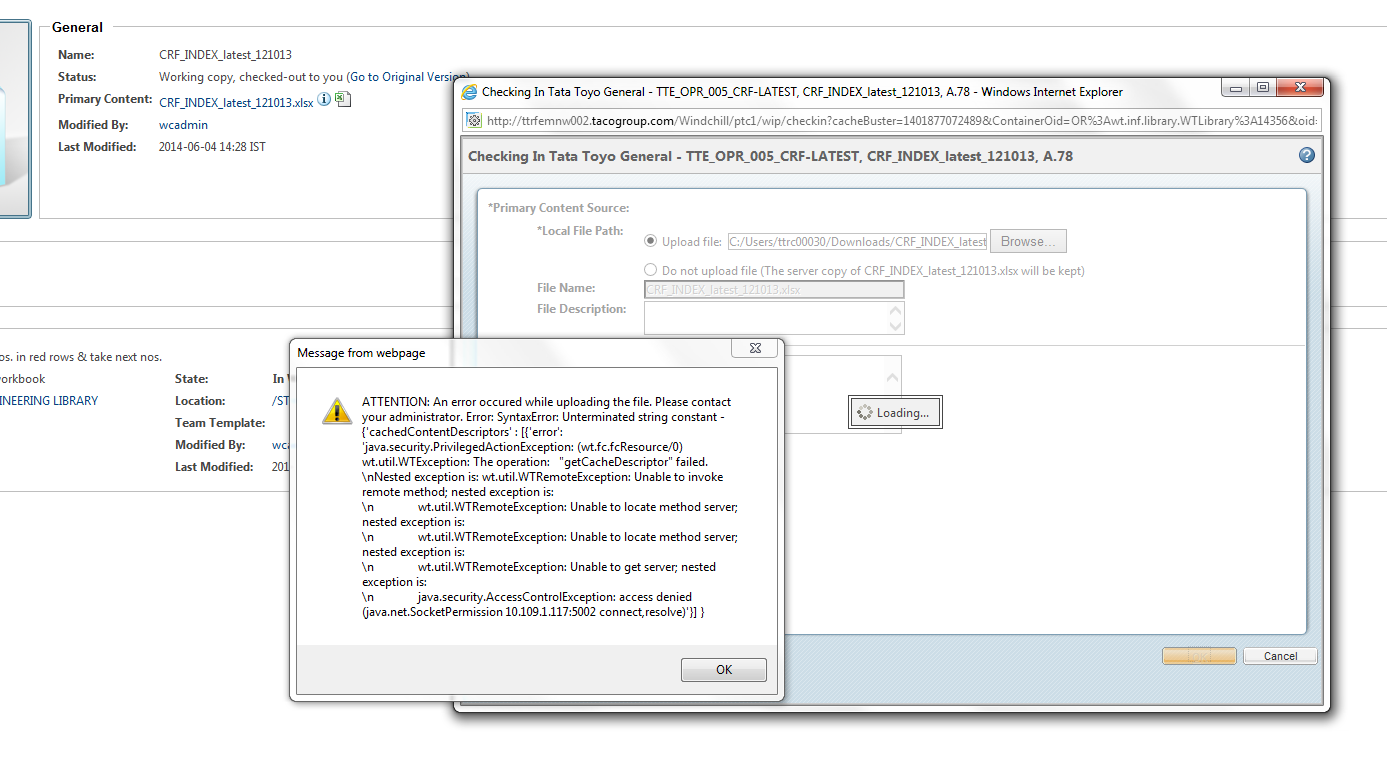
Unable to check In document
  • June 4, 2014
  • 3 replies
  • 3002 views

Error+message+while+checking+in.PNG

Hi,

I think this is not first time when someone is facing this type of issue in Windchill 10.1 ,I tried to find out the solution but most of the blogs or consultants are saying that this could be the browser issue. In my case i think itis not coz i have tried with most of the browsers and their multiple versions....It would be appriciated if anyone can help me

Thanks

Best answer by UmeshMankar

Hello everone,

Thank you guys for joining this discussion,Finally i got permanent solution for this problem it is actually related to java chache and some how browser's also :

  • We just need to delete priv9.ser from user directory of the system
  • for some of the machines it was solved, for others we updated the browser and changed java version

3 replies

13-Aquamarine
June 6, 2014

It looks like you need to configure RMI tunneling. Windchill applets communicate with the Windchill server over RMI calls. But, if there is a firewall between the client and server that is blocking the RMI ports (generally in the range 5002 - 5008), then you'll get an error like this. In that case, you can tunnel RMI traffic over HTTP. See article CS40572 for instructions on configuring RMI tunneling.

13-Aquamarine
June 12, 2014

Hello Vaibhav,

Have you had a chance to try configuring RMI tunneling on your system? If so, can you please respond back and let the community know whether or not this resolved the issue with the check-in applet?

7-Bedrock
June 20, 2014

Hi Chris,

Thanks for the reply , it seems like i got different but a solution

6-Contributor
June 13, 2014

The message says it was anable to start java applet (for drag and drop).

This is certainly due to you java version, verify it : if it is a 64 bit version, install 32 bit version because, by default, Internet Explorer is launch in 32 bit version even if you are in Windows 7 64 bits.

If you are already in java 32 bits, clear java cache and IE cache, close all IE windows and start again Windchill. It will open authorisation windows, and after that, normally it works.

Turn around if all solutions failed : in my settings/Preferences, set "Attachments/File upload mechanism" to "Use basic browser ..."

UmeshMankar7-BedrockAuthorAnswer
7-Bedrock
June 20, 2014

Hello everone,

Thank you guys for joining this discussion,Finally i got permanent solution for this problem it is actually related to java chache and some how browser's also :

  • We just need to delete priv9.ser from user directory of the system
  • for some of the machines it was solved, for others we updated the browser and changed java version