
1-Visitor
November 23, 2011
Solved

Windchill 9.1 Custom Workflow help

  • November 23, 2011
  • 4 replies
  • 12748 views

I am trying to create a custom workflow in Windchill 9.1. I want to have a decision made that will cause the workflow to travel one path or the other for a few items, merge back together for the next few items, then split for the last item based on the earlier decision. I think I can do it with Execute Expression Robots and variables. Any one out there able to help with the scripting, or perhaps suggest a better way.

Currently I use two consecutive workflows, but much of the information requested in the first, is also requested in the second. This means the initiator not only has to initiate two workflows, but also re-enter information that was previously entered in the first workflow. Being able to start one workflow, have the user choose a path and later use that same choice to determine the direction to take on the next fork, would greatly help ease user adoption to the system we've just begun to use.

New to Released Promotion.jpg

Best answer by ShawnPete

I used the check syntax command and I did not have any syntax errors. However, I will try the double equal sign. It may be they are both allowable, but each has a different purpose. I am only hypothesizing, as I have only the experience I gained from my mistakes yesterday.

4 replies

22-Sapphire I
November 23, 2011

standard stuff

1. Create a workflow variable and have set near the beginning of the workflow, probably by a user via an activity

2. Use that variable value in any number of conditionals later in the workflow to branch the flow.

ShawnPete1-VisitorAuthor
1-Visitor
January 2, 2012

That's great... unfortunately, I don't have the experience with the coding to do this. So if anyone reads this post who does have that experience and can create some sample code for me to play with, I will be eternally grateful.

22-Sapphire I
May 14, 2012

How are things in this area lately? Still need help?

1-Visitor
May 22, 2012

Conditional Block.png

1) Create a variable in the workflow of type boolean.

2) Write your question name in the display name of that variable.

3) Add this variable to the activity you want, where it will be answered.(Will be ticked if yes)

4) Now the answer i.e. Yes or No will be saved in the boolean variable.

5) When you want to use it for further routing you can put a conditional block-

Select the Routing type- Conditional.

The Code is-

if(Userip.equals("Inhouse"))

result="Production";

else if(Userip.equals("Outsourced"))

result="Procurement";

else

result="Both";

6) Here Userip is my variable Name.

And the options provided in result should be provided in Roting Events.

1-Visitor
September 17, 2012

Hi Dhanashri,

How can I use the conditional connector to route the process relative to a value returned from the primarybusiness object's attribute.

Regards and Thanks

1-Visitor
September 18, 2012

1) You can create a variable in your workflow eg-IBAValue_EnggFuntion and use the below code to get the attributes of Primary buisness object. The first line of the code depends on the type of your buisness object in this case it is a problem report. In the code below the ViewByPath given is "Engineering_Function", this is the name of the attribute whose value you want to capture.

2) Once you get the attribute value in your workflow variable you can use that variable in conditional connector to route the process.

/*************Code**********************/

wt.change2. WTChangeIssue cm1 = (wt.change2.WTChangeIssue) primaryBusinessObject;

wt.iba.value.IBAHolder ibaHolder1 = (wt.iba.value.IBAHolder)cm1;

ibaHolder1 =wt.iba.value.service.IBAValueHelper.service.refreshAttributeContainer(ibaHolder1, null, null, null);

wt.iba.value.DefaultAttributeContainer attributeContainer =(wt.iba.value.DefaultAttributeContainer) ibaHolder1.getAttributeContainer();

wt.iba.definition.service.StandardIBADefinitionService defService = new wt.iba.definition.service.StandardIBADefinitionService();

wt.iba.definition.litedefinition.AttributeDefDefaultView attributeDefinition = defService.getAttributeDefDefaultViewByPath("Engineering_Function");

wt.iba.value.litevalue.AbstractValueView svc = attributeContainer.getAttributeValues(attributeDefinition)[0];

IBAValue_EnggFuntion = svc.getLocalizedDisplayString();

ShawnPete1-VisitorAuthor
1-Visitor
January 9, 2013

Thank you all for all your help. If anyone is interested I can post the results. I was able to creat a singlr workflow to handle all my promotions.

1-Visitor
January 14, 2013

Hi ShawnPete,

Yes, if you could post the results that would be helpful! Thanks!

ShawnPete1-VisitorAuthor
1-Visitor
January 14, 2013

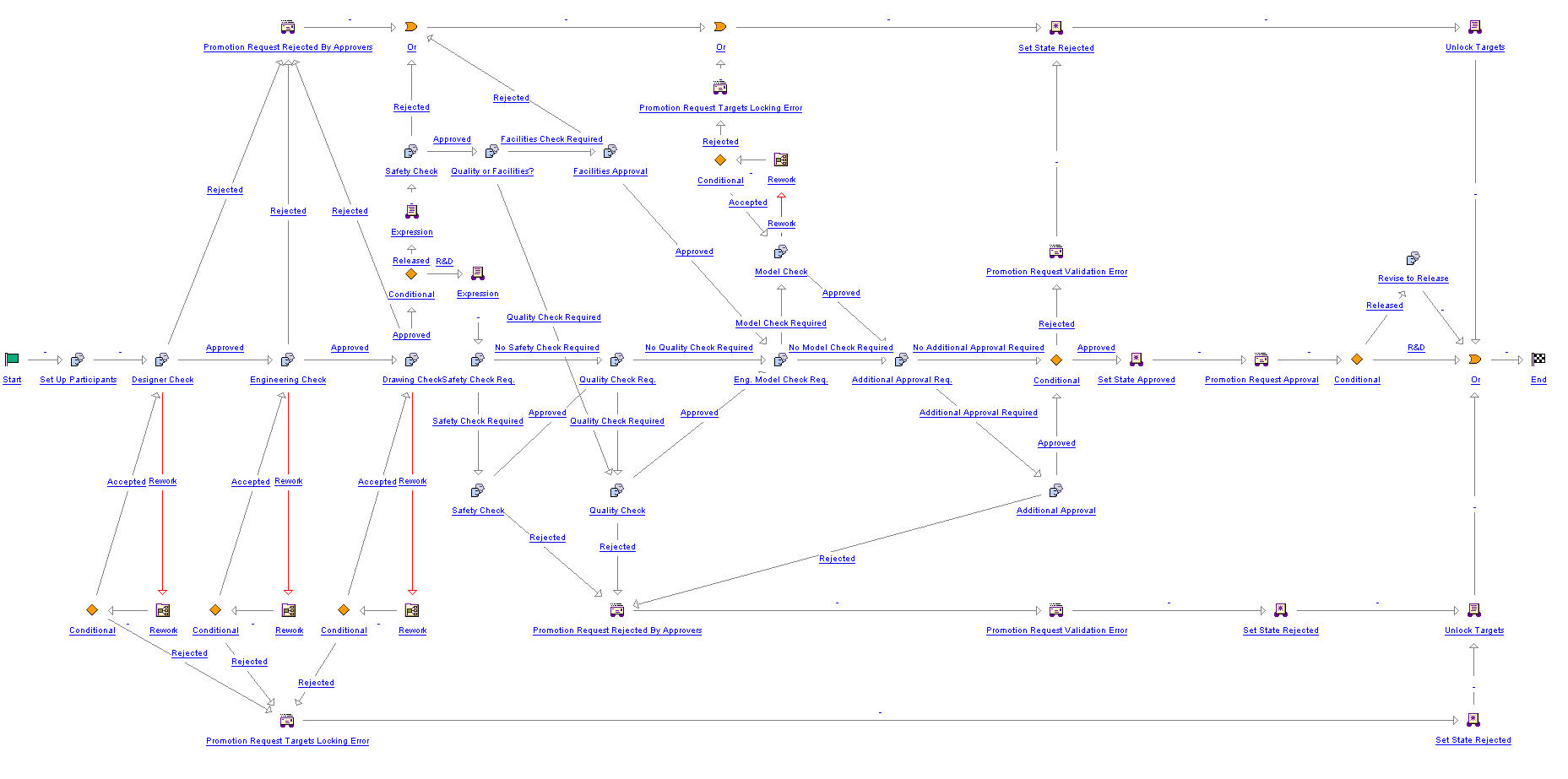
The following image is the resulting workflow. The resultant ZIP is posted to allow others to view the coding.

combined+workflow.jpg