15-Moonstone
February 28, 2023
Solved

Add dropdown list in activity

  • February 28, 2023
  • 2 replies
  • 2747 views

Hi Comunity;

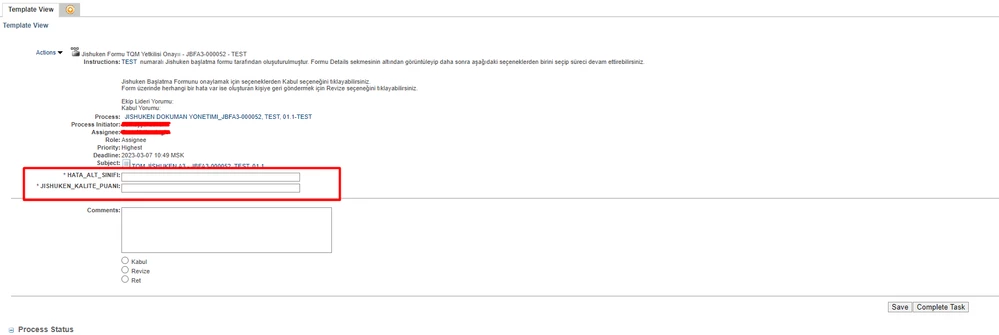
I need to bring the fields in the red box below as a list, how can I do this?

smcvr_0-1677570704408.png


Best answer by HelesicPetr

Hi @smcvr 

You need to learn how to use IDE with annotations (Eclipse, NetBeans, InteliJIdea atc...)

"_HataAltSinifi" is autogenerated class by annotations. 


PTC Supports Eclipse as a IDE that can be used directly with Windchill. 


Windchill PLM - Customization with Eclipse IDE

CS63697: How to install Eclipse IDE for Windchill PLM

Using Eclipse

Example Create Pet Class


PetrH

2 replies

avillanueva
23-Emerald I
23-Emerald I
February 28, 2023

My solution was rather complex to this same problem. I was showing a team input as a drop down. Required a custom JSP template and data utility to format the drop down list. Have you tried making the variable something other than text? Possibly a vector or List object?

smcvr15-MoonstoneAuthor
15-Moonstone
February 28, 2023

I tried wt.fc.EnumeratedType but no result

HelesicPetr
22-Sapphire II
22-Sapphire II
February 28, 2023

Hello @smcvr 

I did it several years ago, and it is not easy as you can think. 


PTC Article CS36017 describes how to achieve the dropdown list in the task page.


hope this can help.


PetrH

smcvr15-MoonstoneAuthor
15-Moonstone
March 2, 2023

Screenshot_3.png

Screenshot_4.png

Screenshot_5.png

I tried the steps but I'm having trouble adding the java file do you have any information about it?

HelesicPetr
22-Sapphire II
22-Sapphire II
March 2, 2023

Hi @smcvr 

You need to define path to class

the value <path_to_class> is not correct

PetrH

