

11-Garnet
May 3, 2025
Question

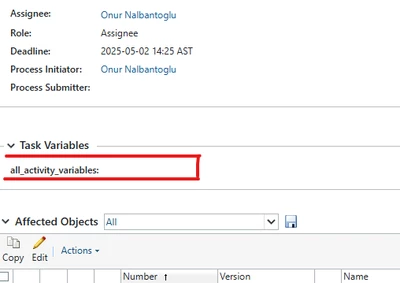
Even though setting is on, this value is not visible at all. Is there anything else we should check?

  • May 3, 2025
  • 1 reply
  • 969 views

Hello,

Reference of topic

Even though this setting is on, this value is not visible at all. Is there anything else we should check?

We called PTC support. We did not get a response from there either.
 

EE_10094183_0-1746296891466.png


1 reply

HelesicPetr
22-Sapphire II
22-Sapphire II
May 5, 2025

Hi @Engine 

Yes, Start the customization process from a beginning. 

Create class, check twice all miswriting Check that the compiled classes are located in right place in the codebase

the class has to be generated by IDE and annotations so IDE has to be correctly configured to use the annotations the extends class _MyClass is autogenerated by IDE 

Check if you define all values in the class  correctly

public static final MySize SMALL = toMySize("sm");
public static final MySize LARGE = toMySize("lrg");
public static final MySize MEDIUM = toMySize("med");

keep in mind that there is very important case sensitive definition.

So if your class is "MySize.class" then the "to" method definition has to be "toMysize()";


rbInfo source has to be located in the windchill/src/ location


Thera are many places where you can do something wrong, so my best practice is to start from the beginning. 


PetrH

Engine11-GarnetAuthor
11-Garnet
May 5, 2025

Hello,


I checked all of these. There is no error. I get this error not only when I want to create a ".class" but also when I want to create an empty variable.


Engin

HelesicPetr
22-Sapphire II
22-Sapphire II
May 5, 2025

Hi @Engine 

You said there is no error, and then you are talking about the error.

Please can you share where is your variable defined take a screenshots of the workflow definition and the variable.

There are several settings that you can allow to see the variable or not see in the workflow. 

PetrH